

What is HIVE.ai
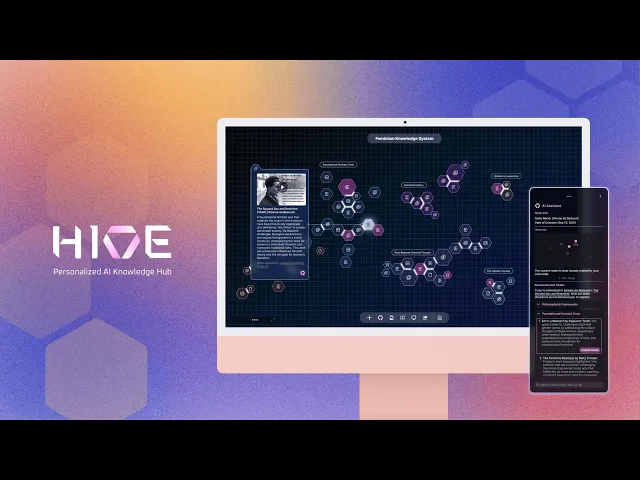
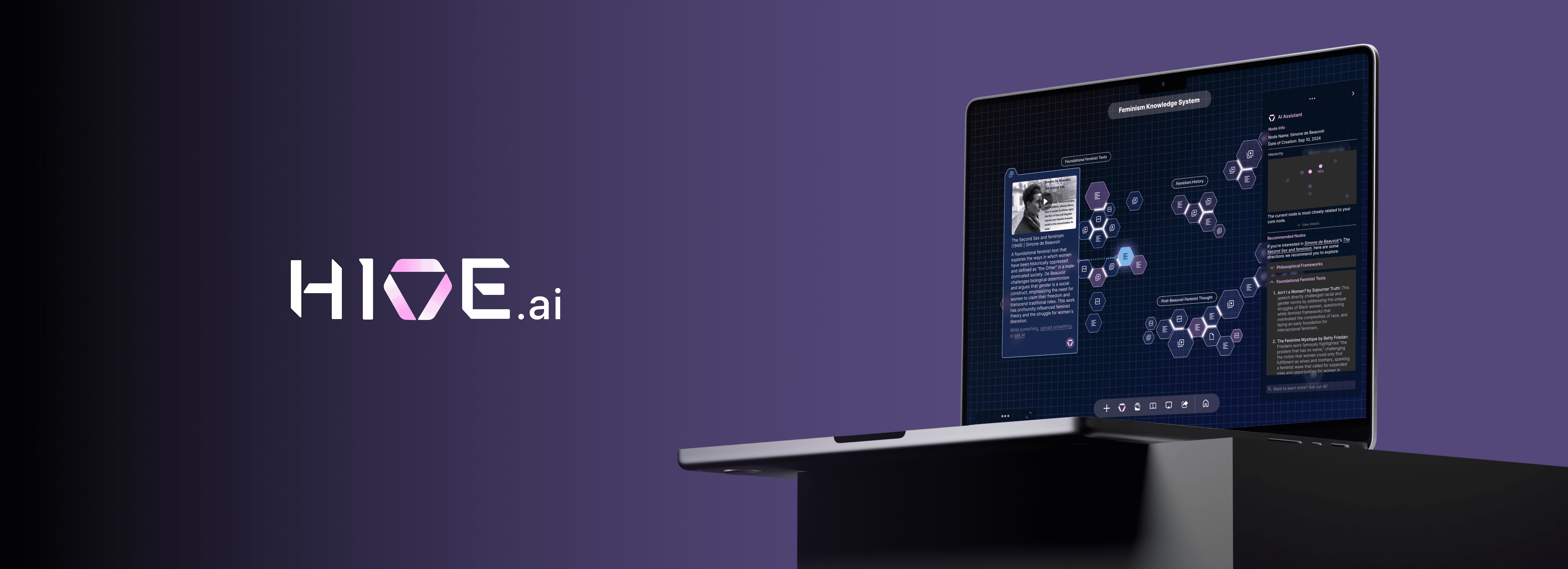
Hive is a B2B desktop tool powered by large language model, designed to assist researchers and learners in organizing and visualizing thought processes. It bridges information gaps to spark inspiration and encourages users to independently explore ideas with subtle AI guidance.
Our Audience
Hive is primariliy designed for researchers who require tools to deeply explore, organize, and present their thought processes while expanding their knowledge network with accurate information.
Project Type
B2B
UXUI Design
Time Length
June 2024 - Jan 2025
My Role
UXUI Design Lead
Marketing video creator
Team
2 UX Researchers, 2 Visual Designers
3 Developers
Design Awards (so far)
2025 Red Dot Design Award
2025 A'Design Award
MUSE Design (Gold)
Indigo Design Award (Gold)
Product Hunt 2024
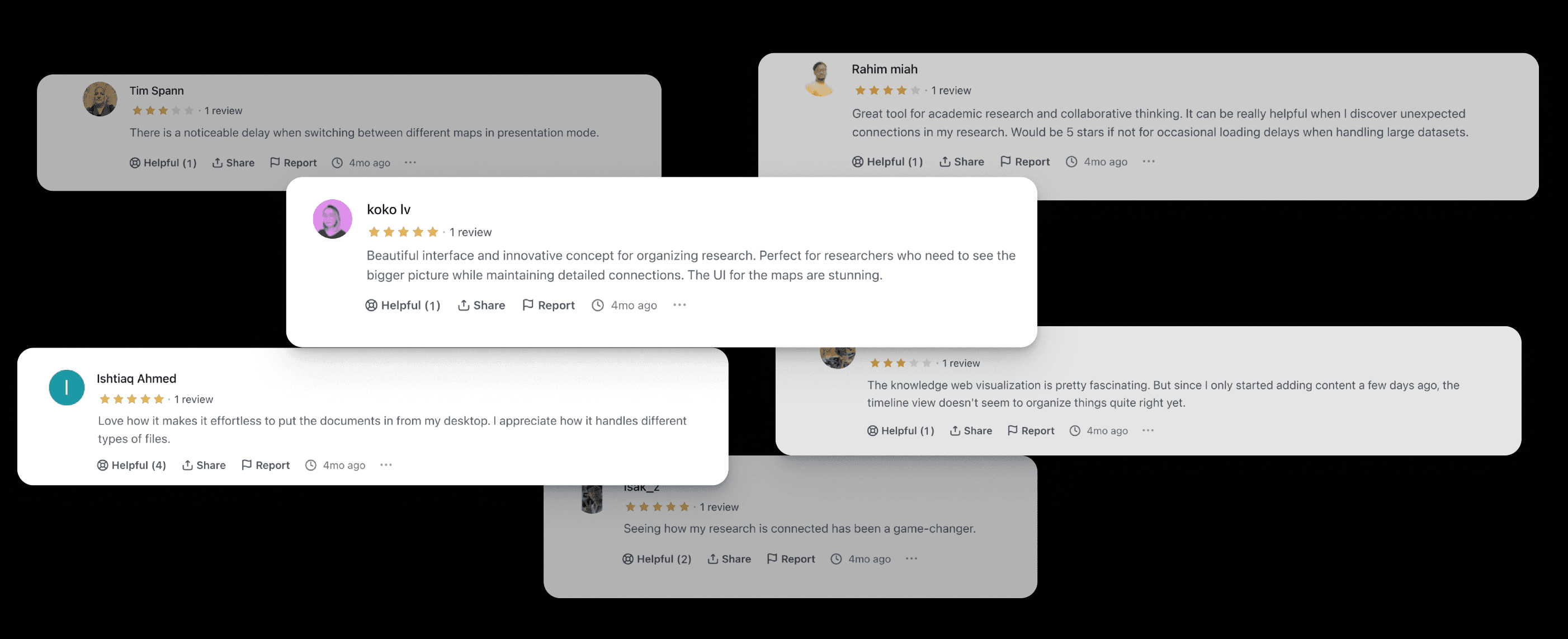
In 2024, our beta prototype got a 4/5 rating on "the best designed interface" for emerging AI tool.
Product Demo Video creator: Huiyang Chen
Background
According to a study by Oxford University, 76% of researchers use AI tools in their work. However, only 16% of those tools are designed for research, learning and data visualization.
What we want to rennovate
Steep Learning Curve
Steep Learning Curve
Users face a steep learning curve due to the overly complex user interface, hindering efficient usage of the platform.
Lack of Growth Mindset
Lack of Growth Mindset
AI-generated structures and content offer limited flexibility for changes, failing to foster a growth mindset, identify missing information, or spark inspiration.
Limited Flexibility for Complex Visuals
Limited Flexibility for Complex Visuals
85% of existing AI tools cannot create or interpret complex data visualizations, which are essential for research and data analysis.
Feature 1
Feature 1
Build From the Ground Up
Build From the Ground Up
Begin creating node elements by dragging or uploading various types of materials, such as videos, voice recordings, links, and text, into an empty container on the freeform canvas.
Begin creating node elements by dragging or uploading various types of materials, such as videos, voice recordings, links, and text, into an empty container on the freeform canvas.
Feature 2
Feature 2
Co-Create with AI
Co-Create with AI
View node status, including information scarcity, disparity, and hierarchy, and discover new sources of inspiration by interacting with the intuitive panel.
View node status, including information scarcity, disparity, and hierarchy, and discover new sources of inspiration by interacting with the intuitive panel.
Feature 3
Smart Grouping
Smart Grouping
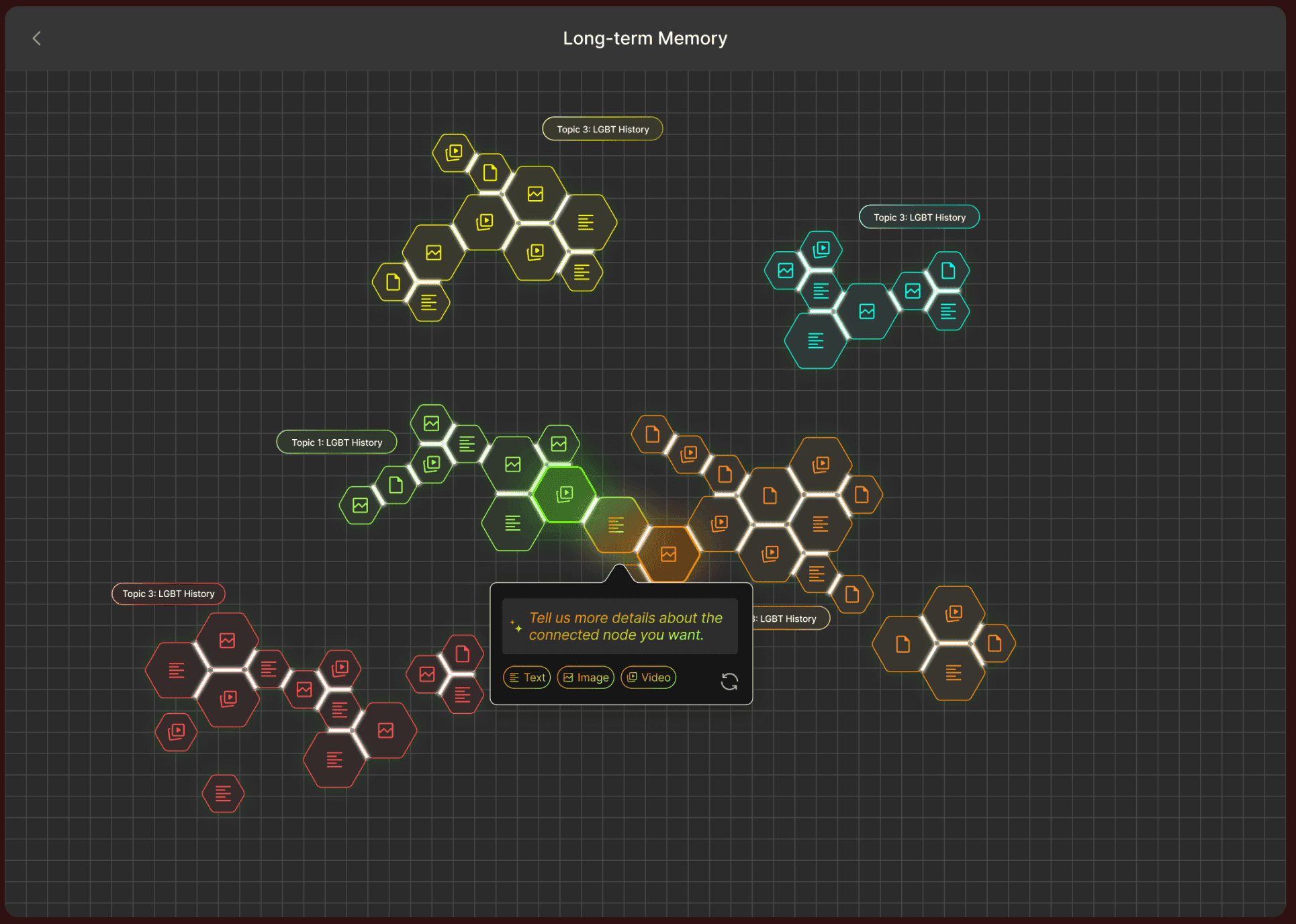
When topics are identified as interconnected, data points can be regrouped, and color coding will automatically adjust to represent their union.
When topics are identified as interconnected, data points can be regrouped, and color coding will automatically adjust to represent their union.
Feature 4
Bridging Info Gap
Bridging Info Gap
Use the side pane to explore recommended data points that can fill in the missing node connection. Positions and colors of new clusters will be automatically generated.
Use the side pane to explore recommended data points that can fill in the missing node connection. Positions and colors of new clusters will be automatically generated.
Feature 5
Presentation and Discovery
Presentation and Discovery
Transform each research project into infographics to showcase progress and findings while gaining insights into personal research and learning strengths across various topics.
Transform each research project into infographics to showcase progress and findings while gaining insights into personal research and learning strengths across various topics.
Research & Discover
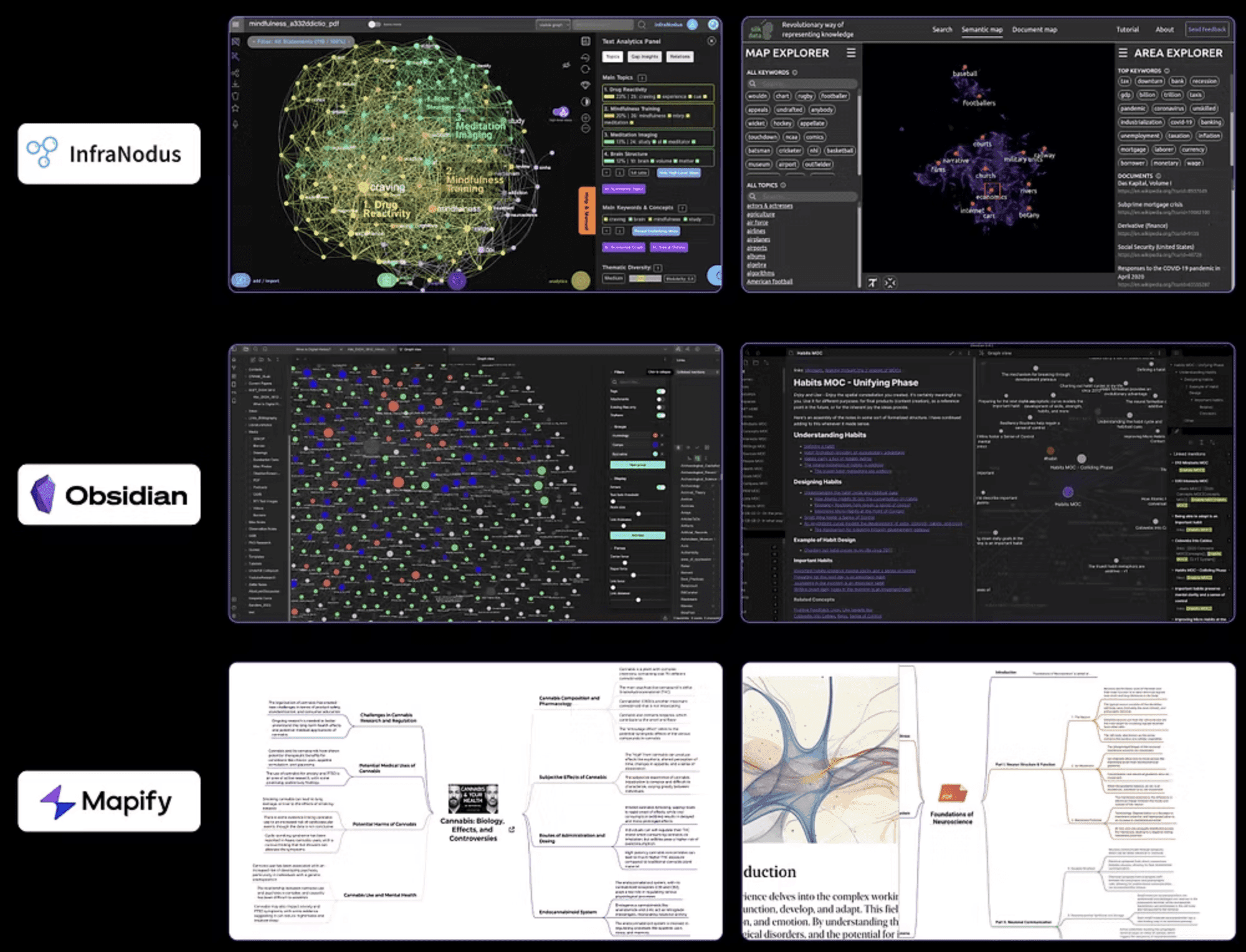
Competitor Analysis
Steep Learning Curve
Users face a steep learning curve due to the overly complex user interface, hindering efficient usage of the platform.
Restricted Growth
AI-generated structures and content offer limited flexibility for changes, failing to foster a growth mindset, identify missing information, or spark inspiration.
Inaccurate Keyword Filtering
Filtering information using keywords is often inaccurate, which prolongs the process of finding relevant materials.
Discovery
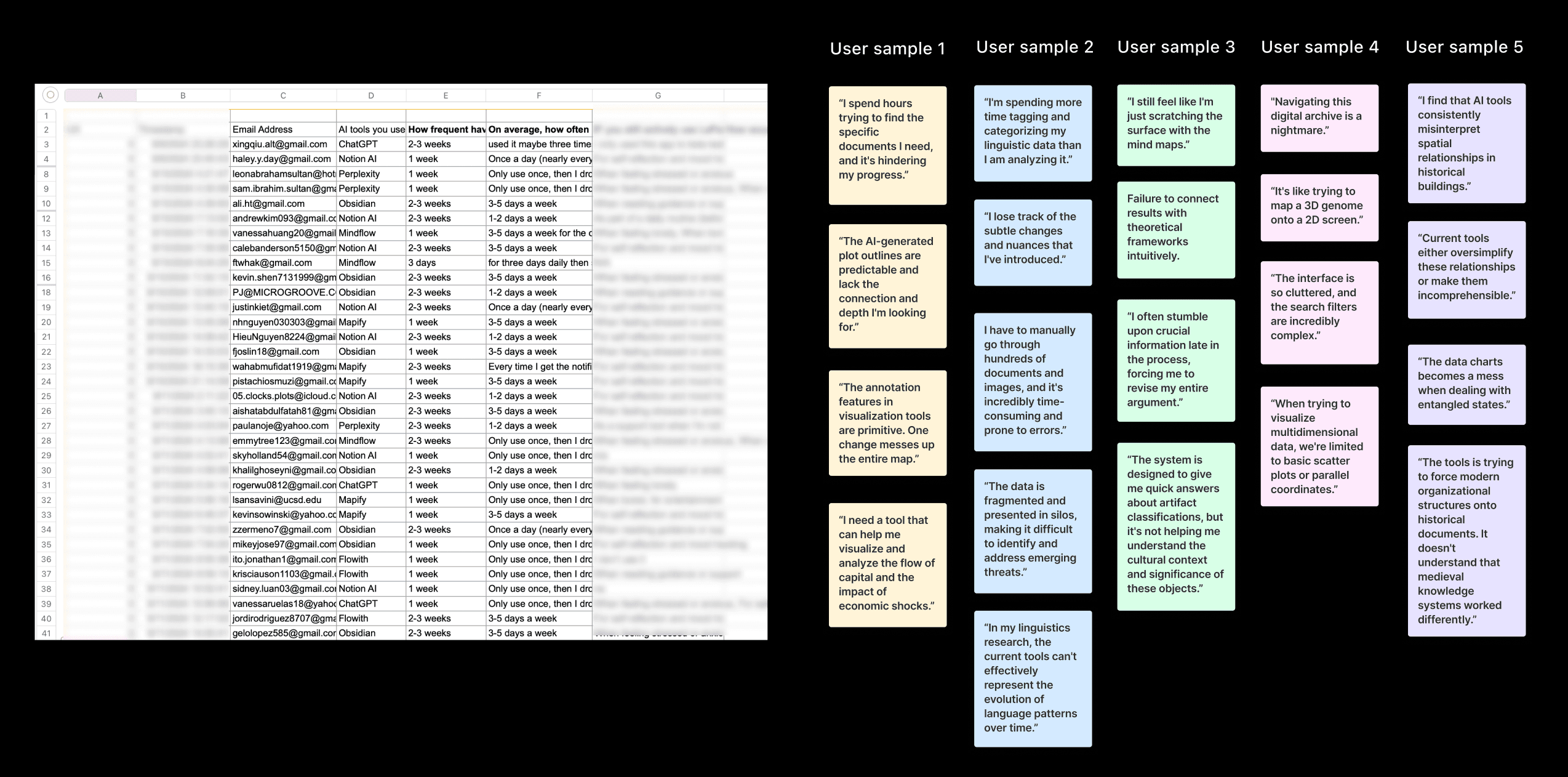
Our team conducted 35 semi-structured interviews with graduate researchers from top 50 universities in the U.S., with 23 participants providing detailed walkthroughs of their current tools and research methods.
"When I’m deep into research, I tend to focus on isolated pieces of information and miss the bigger picture of how everything ties together."
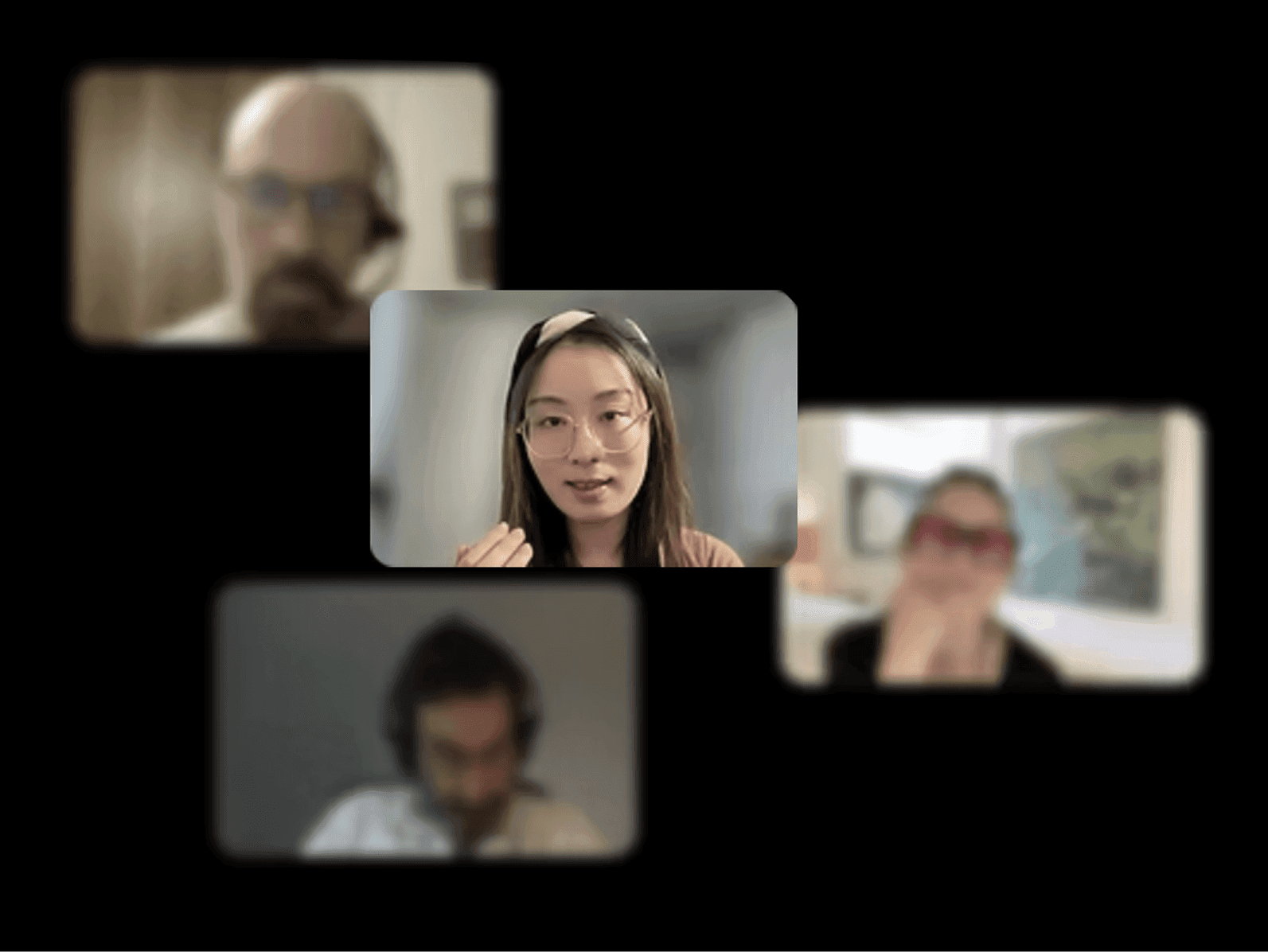
"I sometimes lose sight of how my initial thoughts transformed as I dug deeper into the research. It feels like the process gets blurred."
(Zoom interview screenshots)
(Zoom interview screenshots)
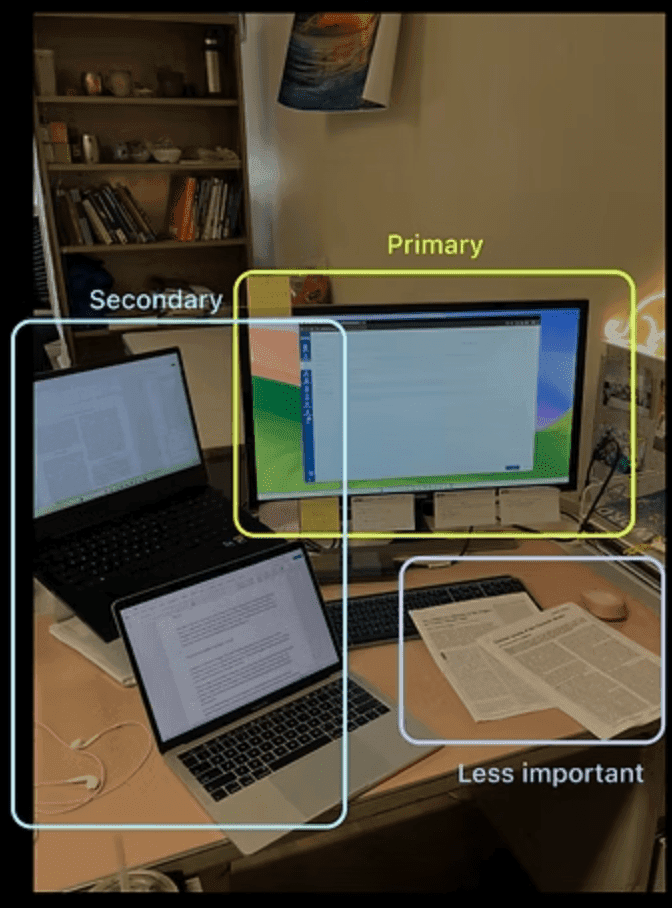
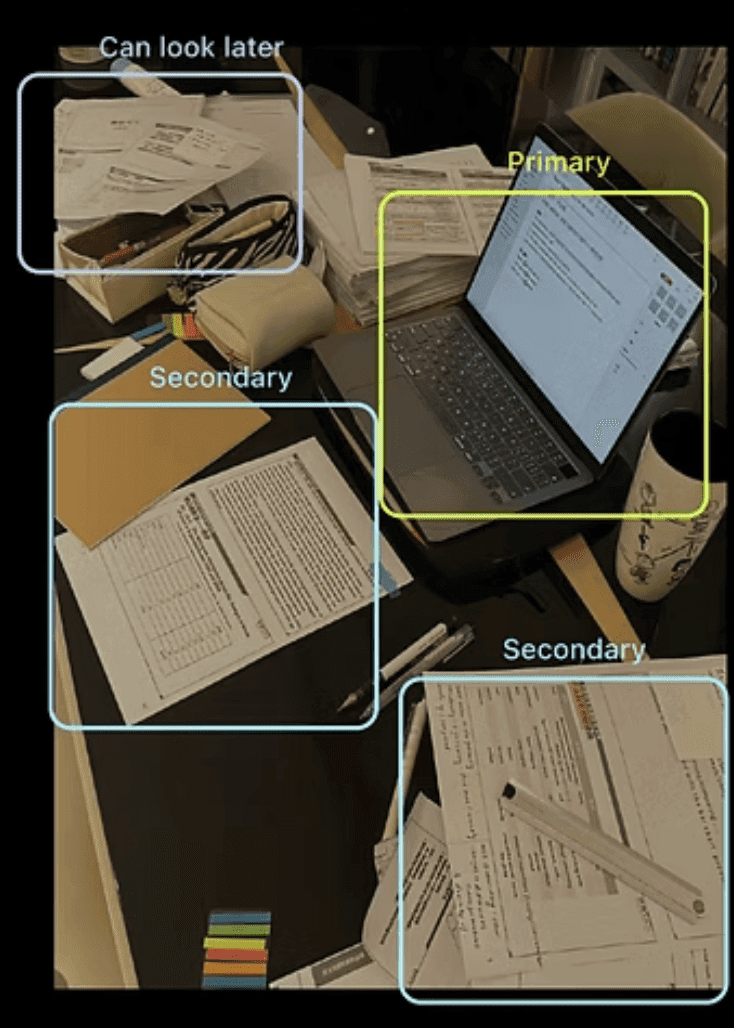
Through observations from field research, I discovered that their work space were set up in a modular way that a different areas of the desk dedicates to a certain function. The intention was to see hierarchy in tasks and to categorize information into big chunks. This helps them to improve memory retension.
Understanding User Needs
Main pain points
01
Over-reliance on AI
Over-reliance on pre-set prompts for quick answers diminishes curiosity and ability to self explore, further leads to untrained minds.
01
Over-reliance on AI
Over-reliance on pre-set prompts for quick answers diminishes curiosity and ability to self explore, further leads to untrained minds.
02
Fail to identify interconnections
Difficulty adapting to knowledge web as a whole leads to lack of comprehensive understanding across topics.
02
Fail to identify interconnections
Difficulty adapting to knowledge web as a whole leads to lack of comprehensive understanding across topics.
03
Challenges in Tracking Learning Progress
Failure of seeing how thoughts evolve impedes reflection and motivation.
03
Challenges in Tracking Learning Progress
Failure of seeing how thoughts evolve impedes reflection and motivation.
04
Difficulties in presenting collective thoughts
Time-consuming to create a visual representation of the entire research scope from multiple data perspectives.
04
Difficulties in presenting collective thoughts
Time-consuming to create a visual representation of the entire research scope from multiple data perspectives.
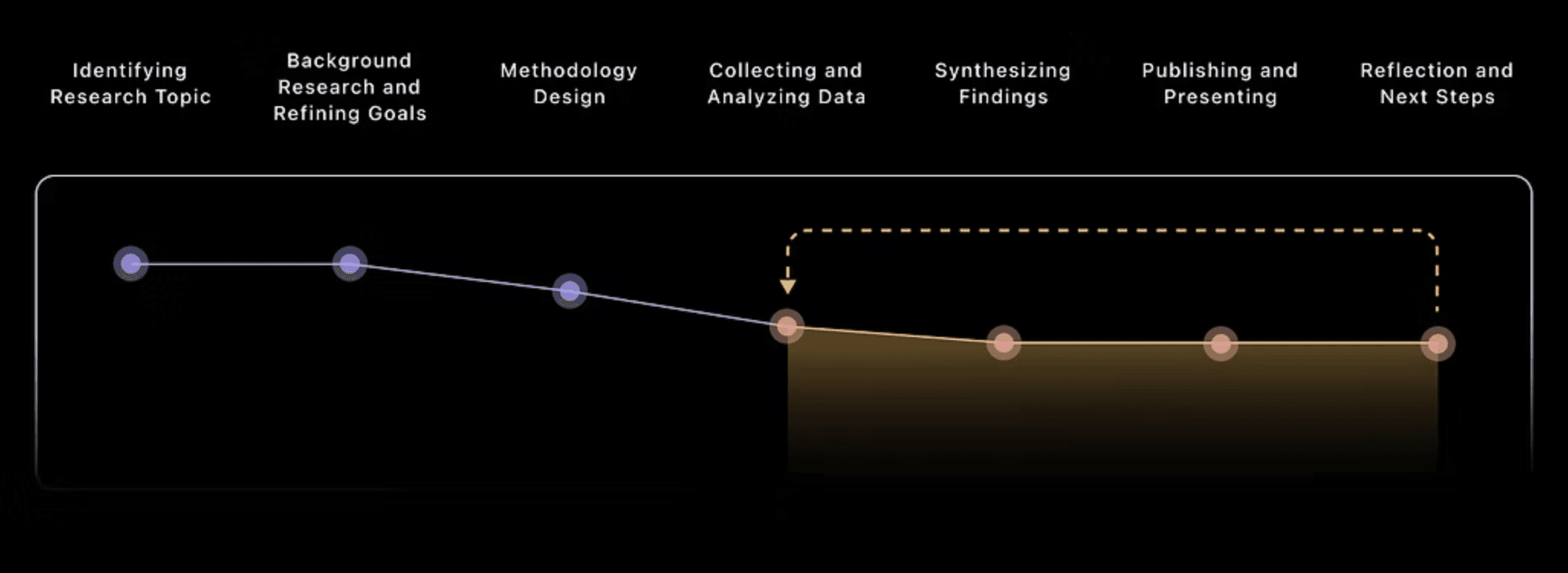
(Yellow steps are the most likely to cause fatigue)
(Yellow steps are the most likely to cause fatigue)
Concept Development
Ecological Thinking
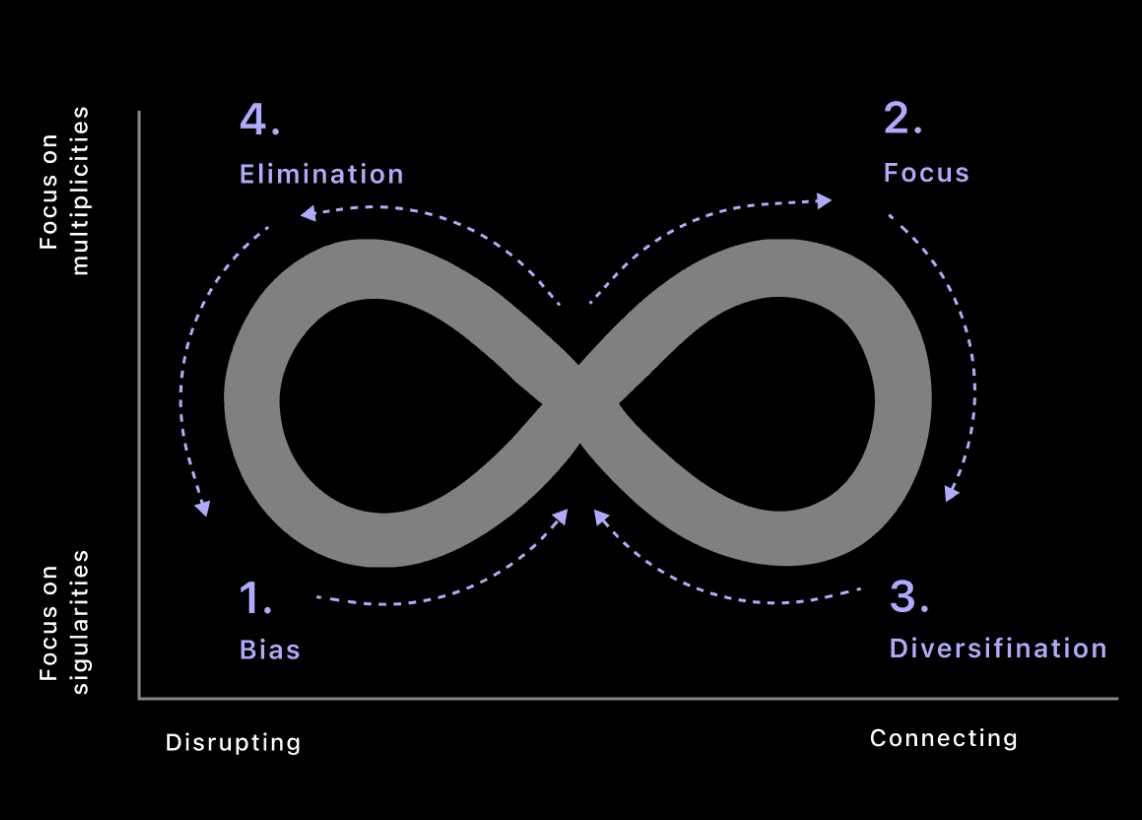
Ecological thinking means no single idea dominates for too long. When one idea takes up too much attention, we risk falling into cognitive biases, narrow thinking, or even harmful thought patterns. This can disrupt the balance of our thinking and limit our ability to explore new ideas.
The goal for Hive.ai is to ecological thinking is to minimize bias as much as possible while encouraging divergent thinking and maintaining focus to ensure a healthy, balanced flow of ideas.
Features Map
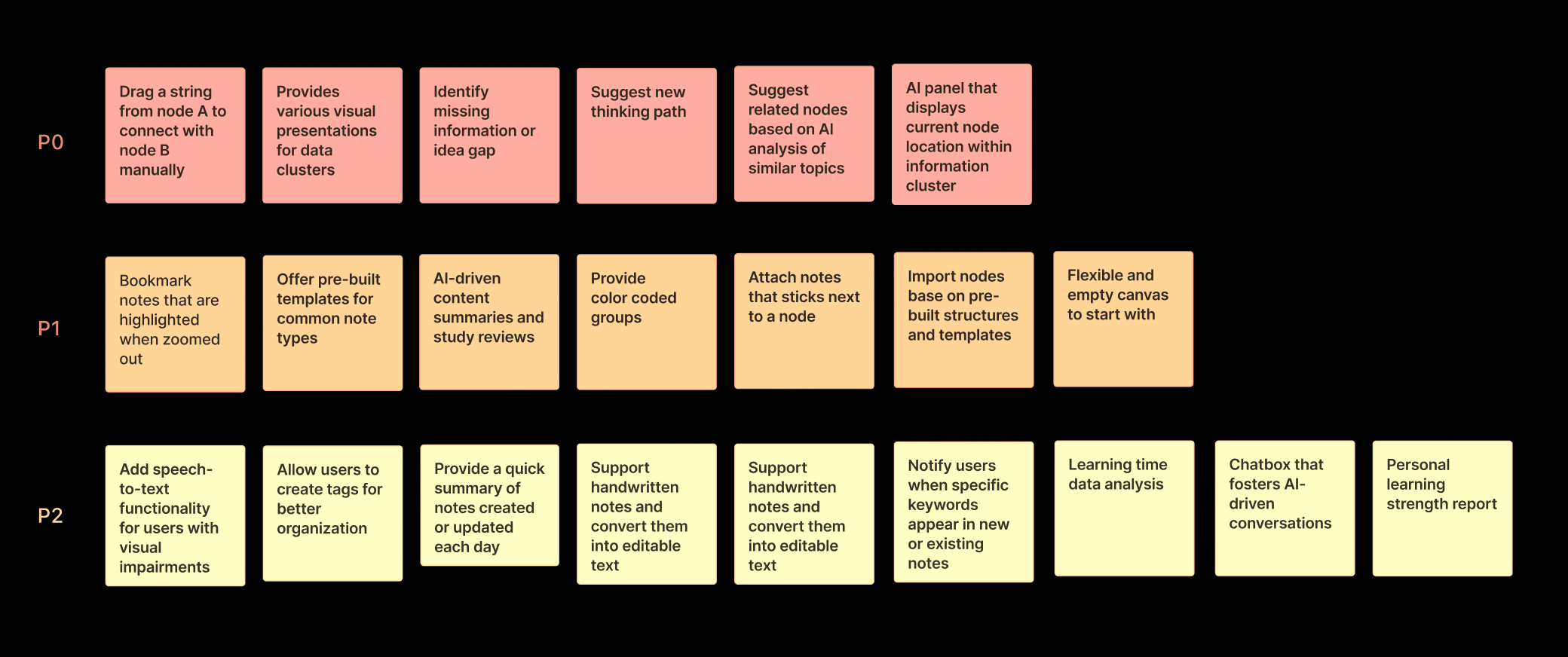
After gathering insights from our research, my team and I brainstormed features to address user needs. We then prioritized them from high to low, which helped us identify the initial MVP.

Design
Starting With a Node Element (Exploration)
Starting With a Node Element (Exploration)
One of the biggest challenges is to ensure efficient material input to quickly build up knowledge assets.
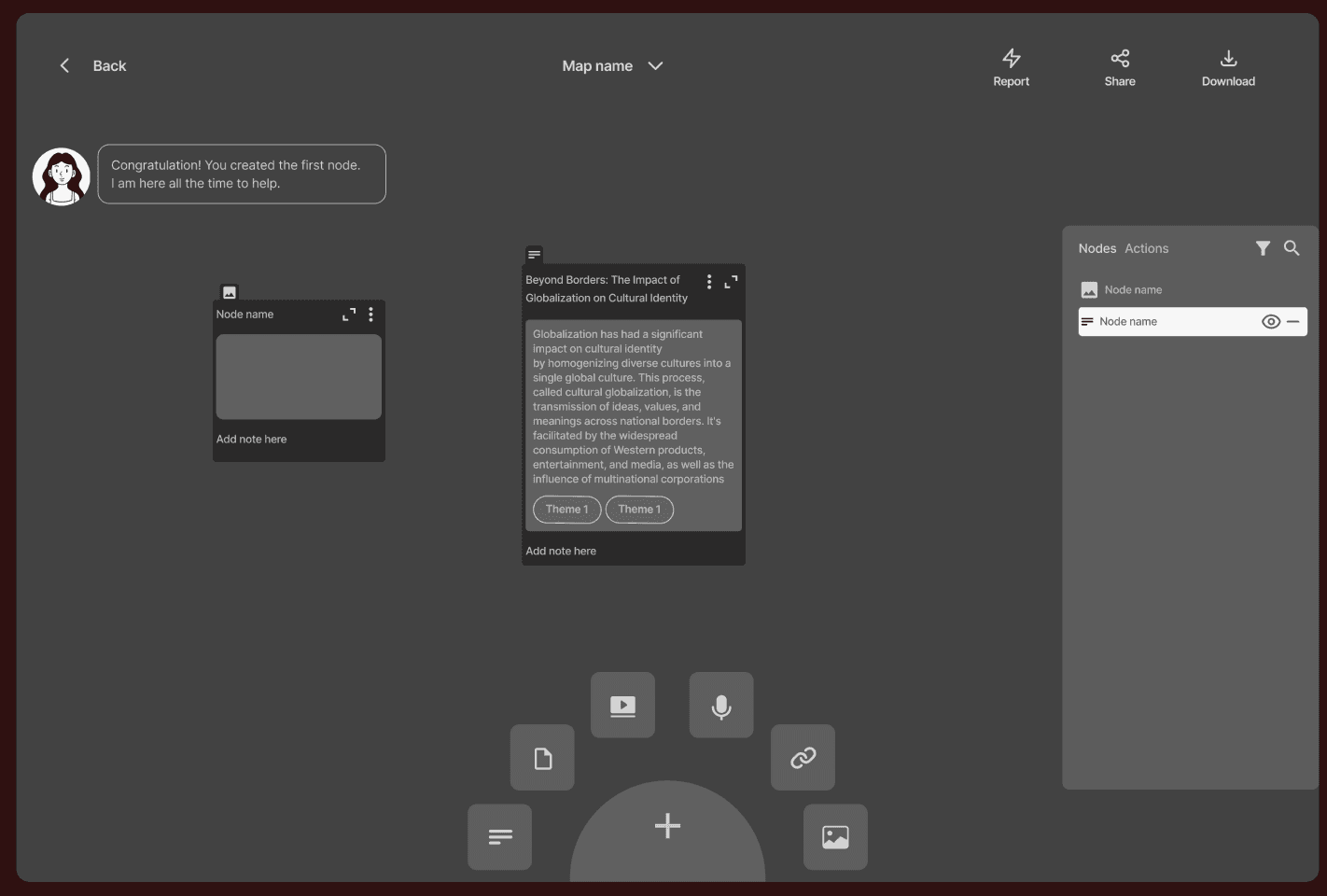

Tag-based information search nodes are very time-consuming to navigate to the target nodes.
Tag-based information search nodes are very time-consuming to navigate to the target nodes.
A clustered interface makes it very difficult to track information.
A clustered interface makes it very difficult to track information.
An additional step is required to choose the type of node before inserting material.
An additional step is required to choose the type of node before inserting material.
Starting With a Node Element (Solution)
Starting With a Node Element (Solution)
Our solution is to offer freeform information containers that accommodate all input types—videos, images, text, and voice—minimizing the time required to input data into the correct entry point.
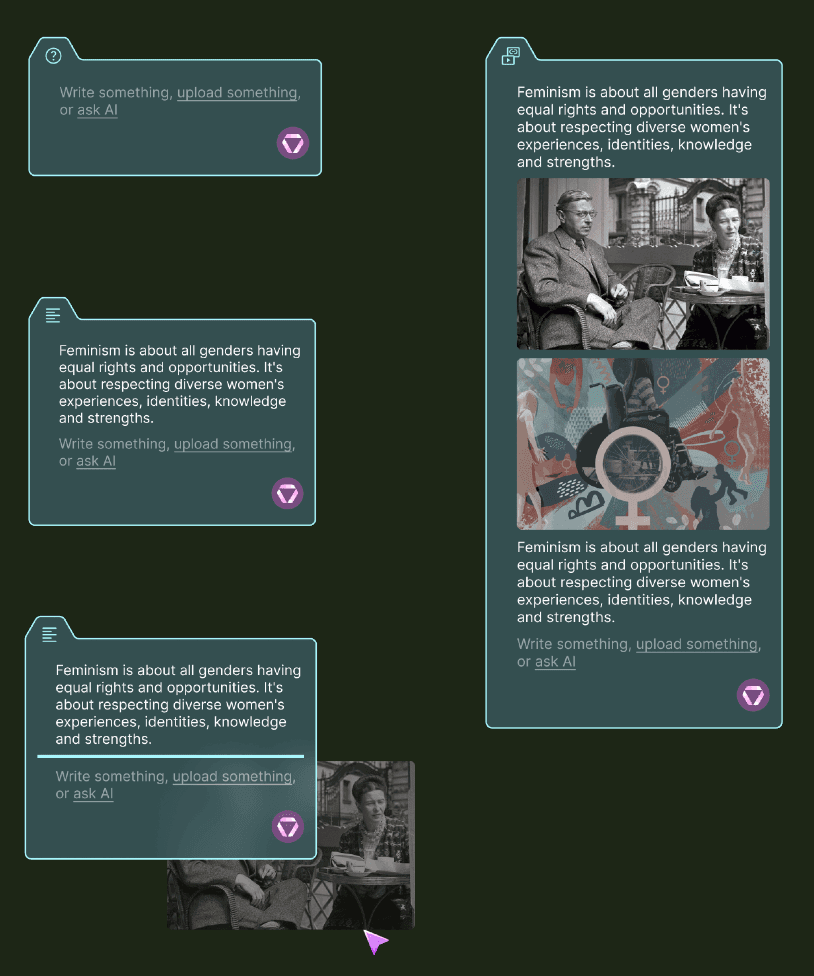

Directly drag materials from your computer desktop or input them from any device.
Directly drag materials from your computer desktop or input them from any device.
Encourage user-generated inputs instead of over-reliance on AI to initiate ideas.
Encourage user-generated inputs instead of over-reliance on AI to initiate ideas.
Supporting idea generation from any source boosts creativity and imagination.
Supporting idea generation from any source boosts creativity and imagination.
Connecting Nodes (Exploration)
Connecting Nodes (Exploration)
Imagine having hundreds of data points with information scattered too widely to form meaningful connections.
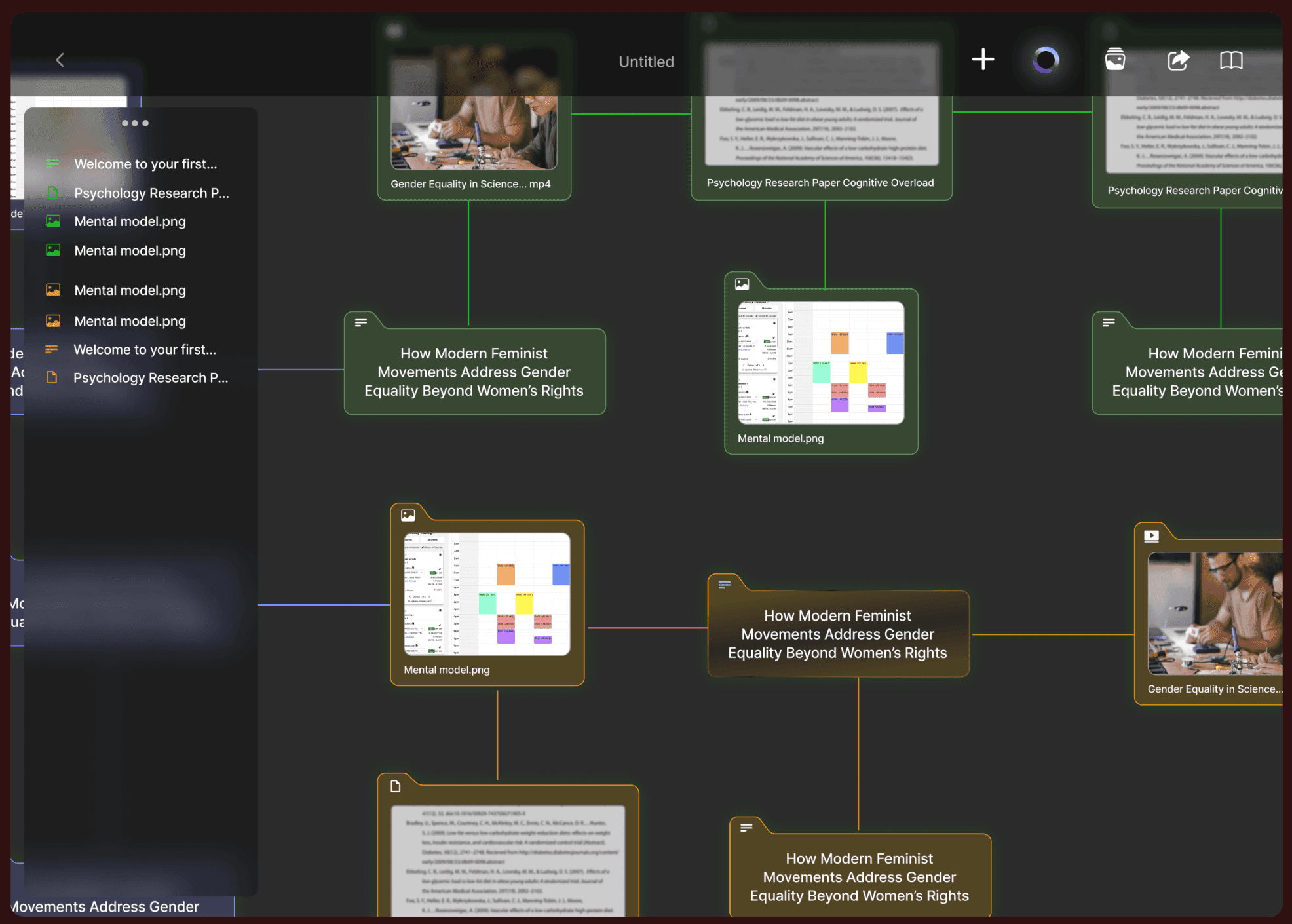
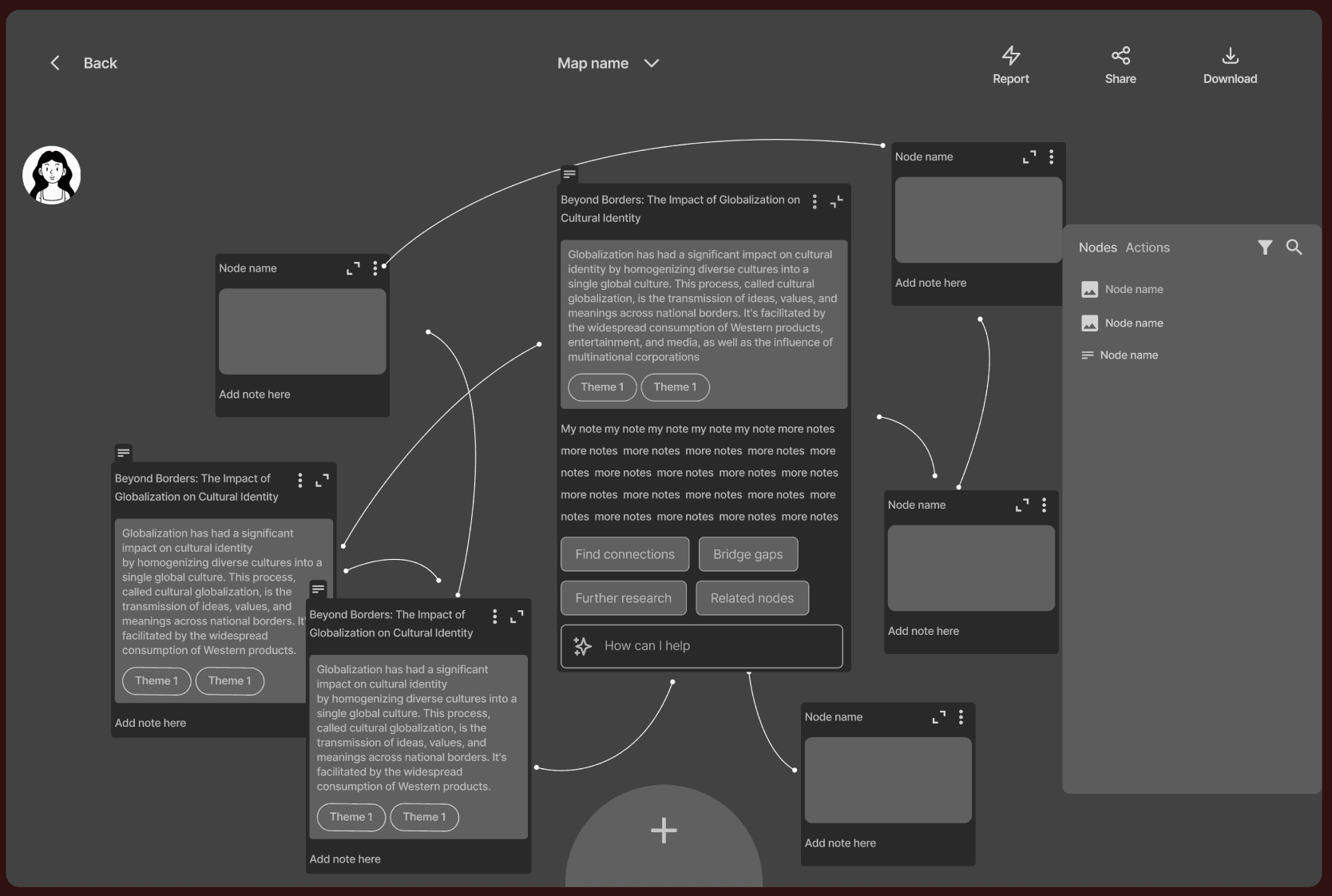
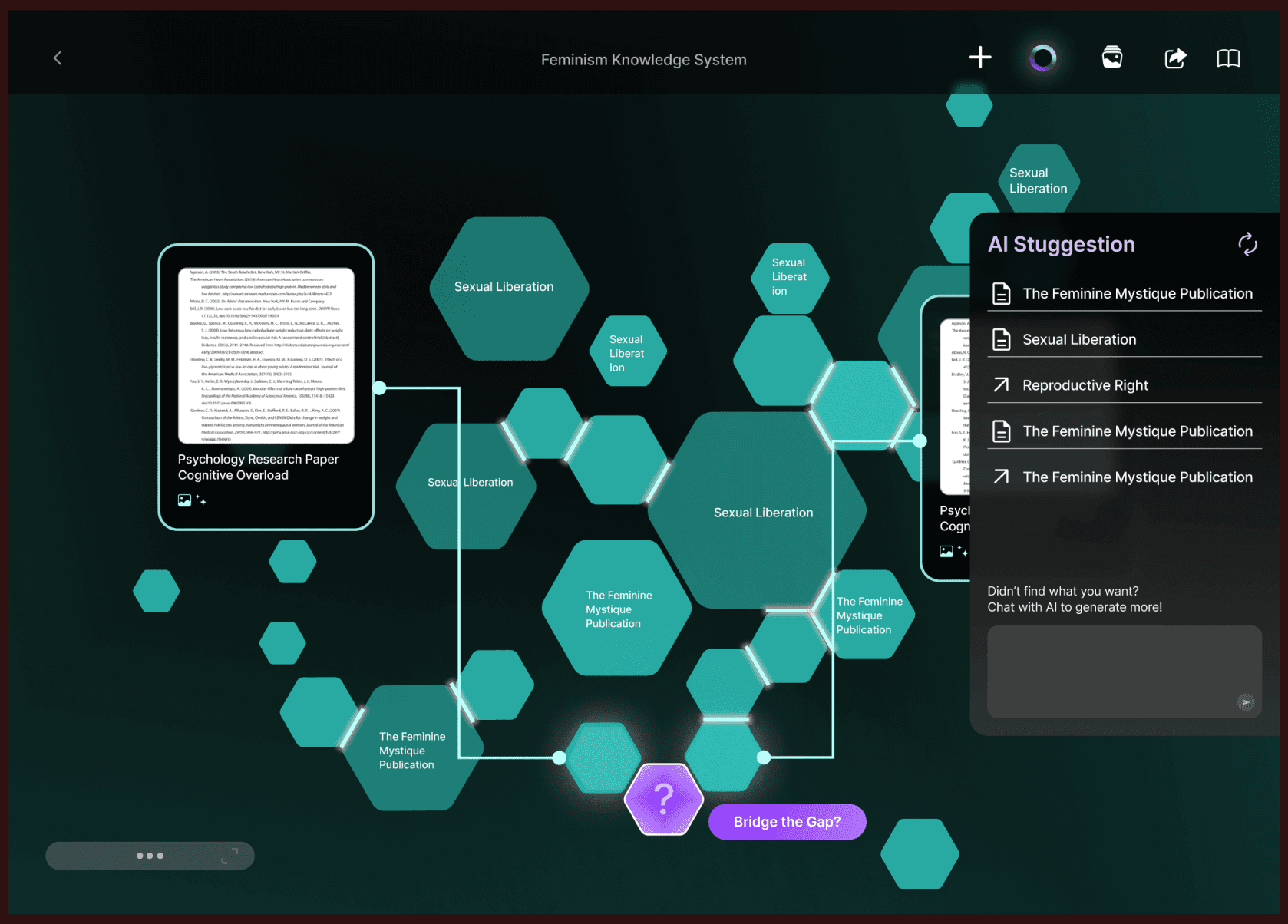
The industry-standard method of string-connecting nodes often turns data points into a visually overwhelming cluster, slowing down the process of targeting and grouping.
The industry-standard method of string-connecting nodes often turns data points into a visually overwhelming cluster, slowing down the process of targeting and grouping.
Difficult to identify the information hierarchy when data points become complex.
Difficult to identify the information hierarchy when data points become complex.
Connecting Nodes (Solution)
Connecting Nodes (Solution)
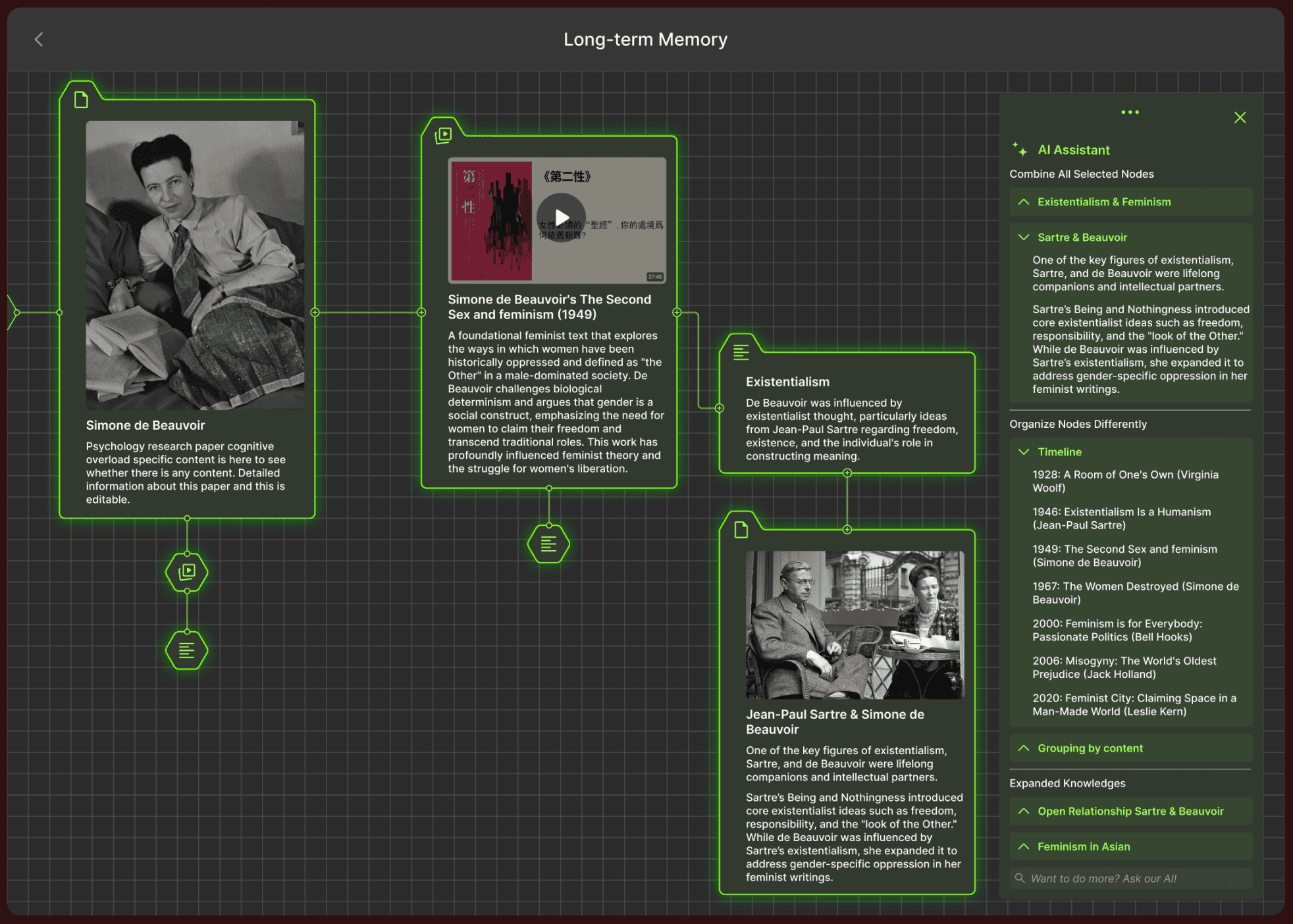
The solution effectively visualizes connections while highlighting information priorities, scarcity, density, and disparity. Furthermore, it incorporates AI-driven support to generate new nodes, fostering inspiration and innovation.
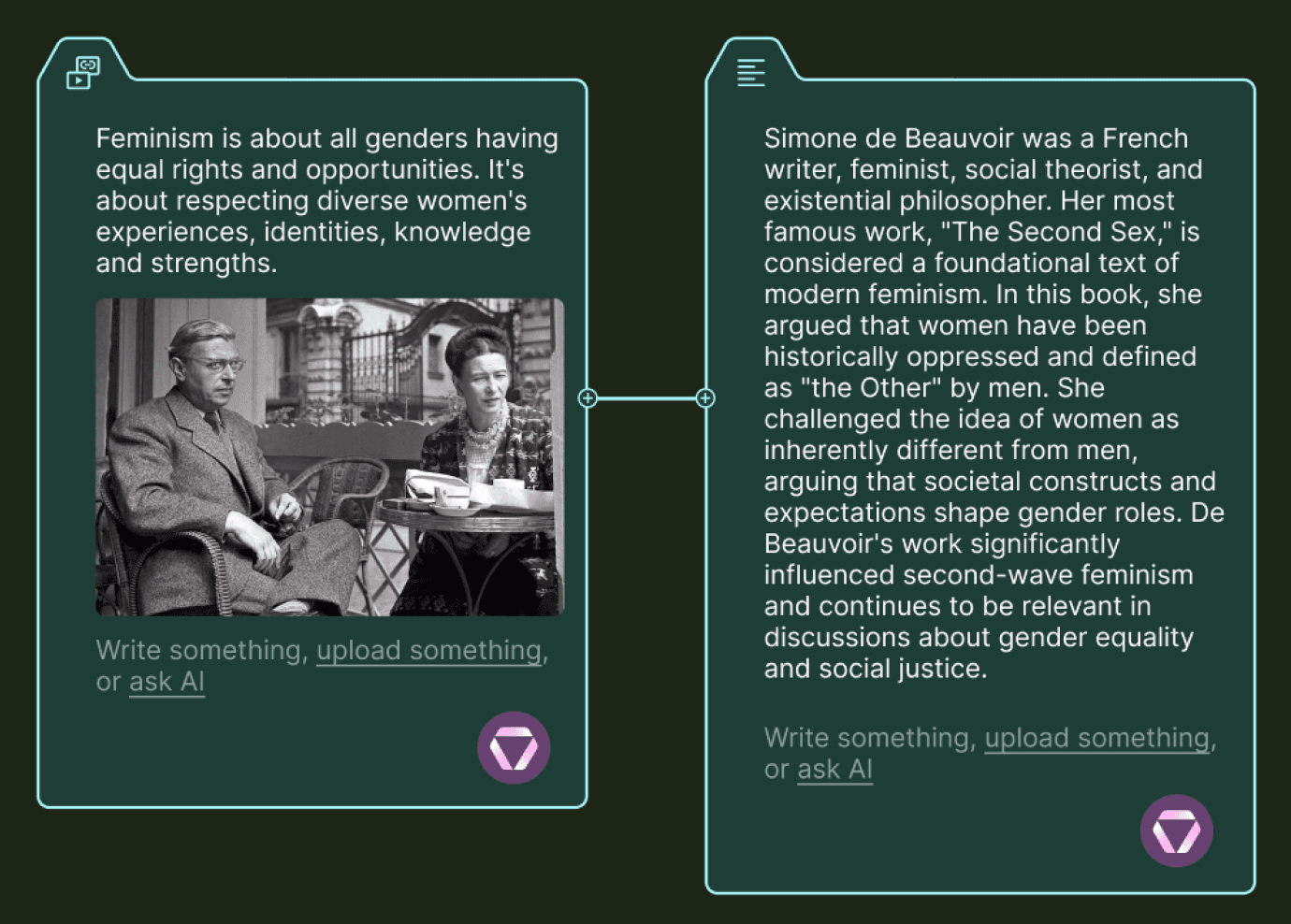
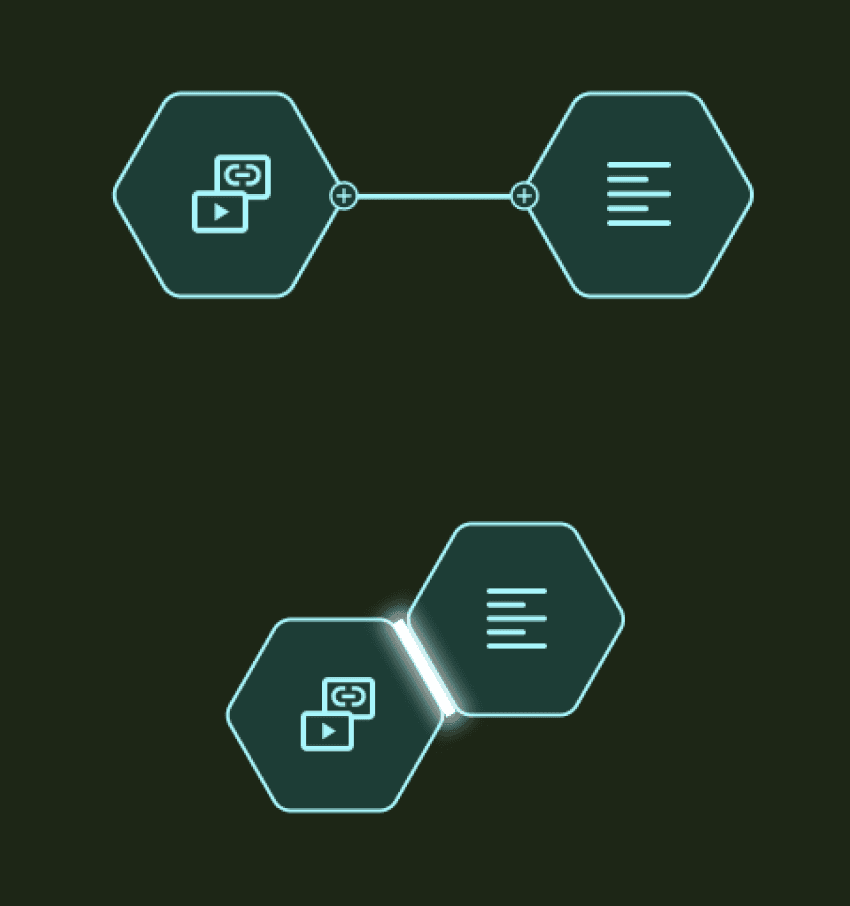
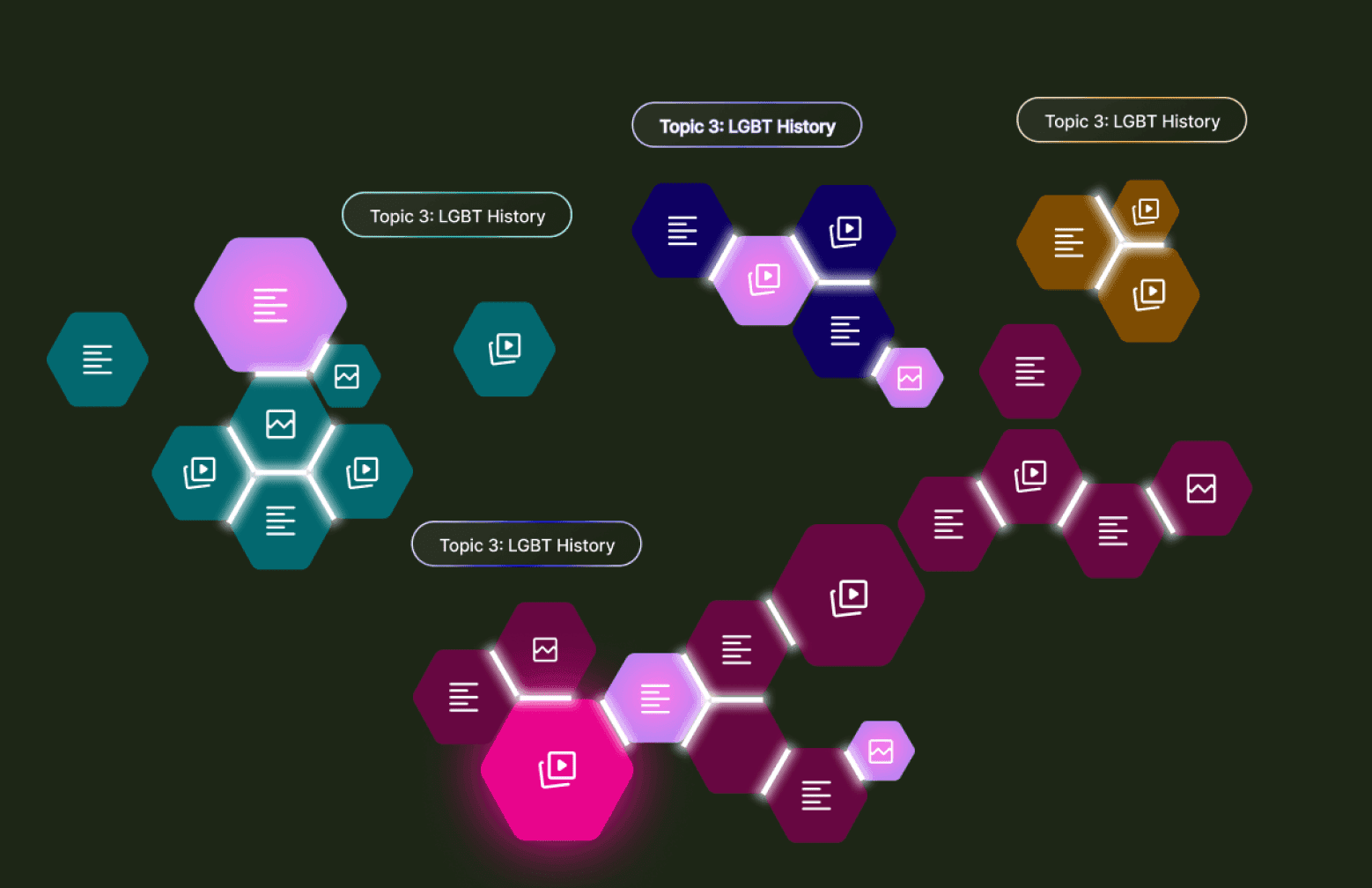
When zoomed out, the rectangular nodes with detailed information transform into hexagons, providing a quick overview of the scope and making it easier to find information.
When zoomed out, the rectangular nodes with detailed information transform into hexagons, providing a quick overview of the scope and making it easier to find information.
The hexagon shape represent solid, expandable connections that can easily attach to similar topics, regroup, or detach.
The hexagon shape represent solid, expandable connections that can easily attach to similar topics, regroup, or detach.
Bridging info gaps (Exploration)
Bridging info gaps (Exploration)
Tracking the progress of thinking has been one of the most valuable processes in research. Finding the missing data pieces will strengthen the knowledge web and improve memory retention.
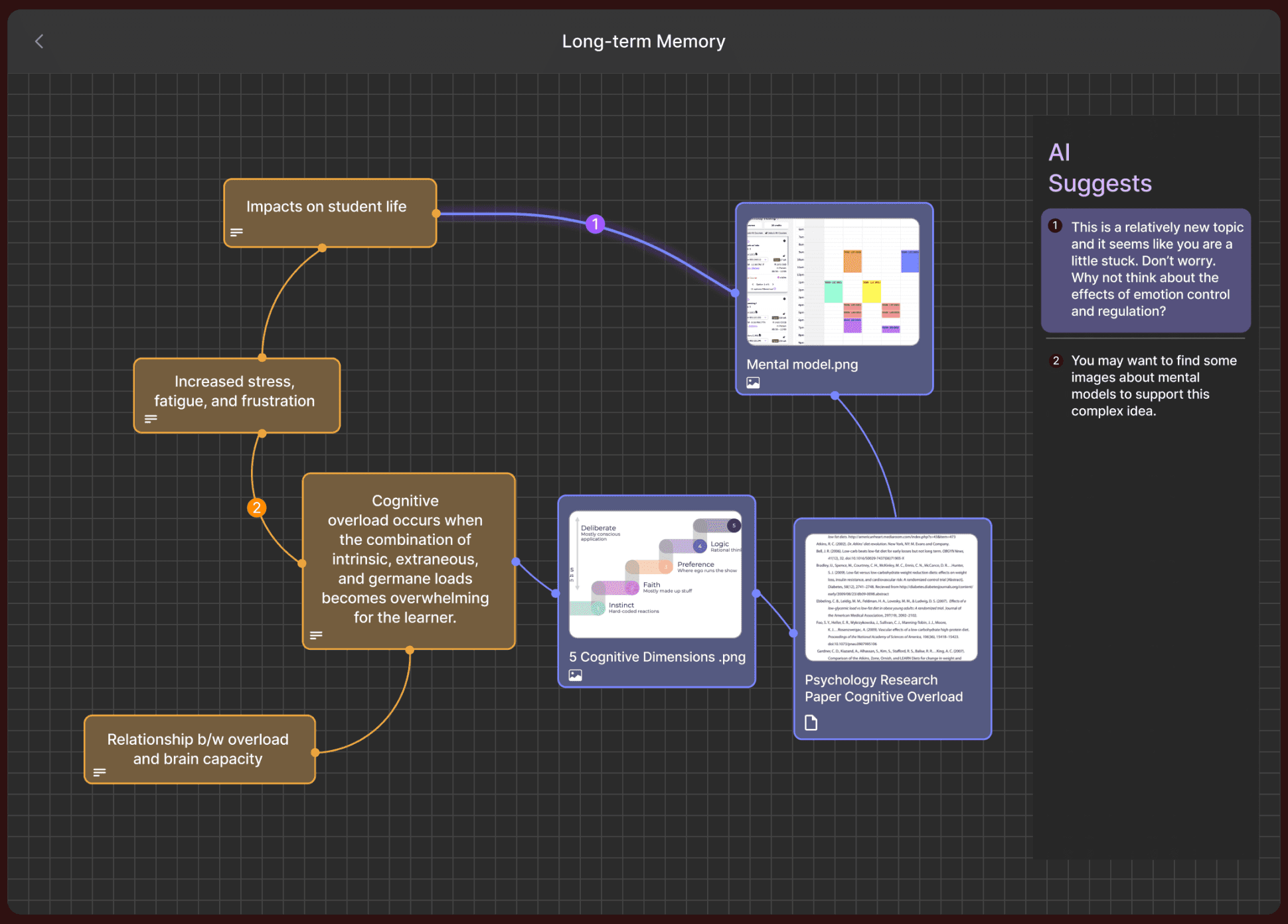
Using pop-up screens not only requires many clicks but also distracts from the visual when there are hundreds of nodes in the background.
Using pop-up screens not only requires many clicks but also distracts from the visual when there are hundreds of nodes in the background.
Not giving users the option to choose the bridge outcome or providing too many filtering steps can result in either limited research or an unnecessarily complicated flow.
Not giving users the option to choose the bridge outcome or providing too many filtering steps can result in either limited research or an unnecessarily complicated flow.
Briding info gaps (Solution)
Briding info gaps (Solution)
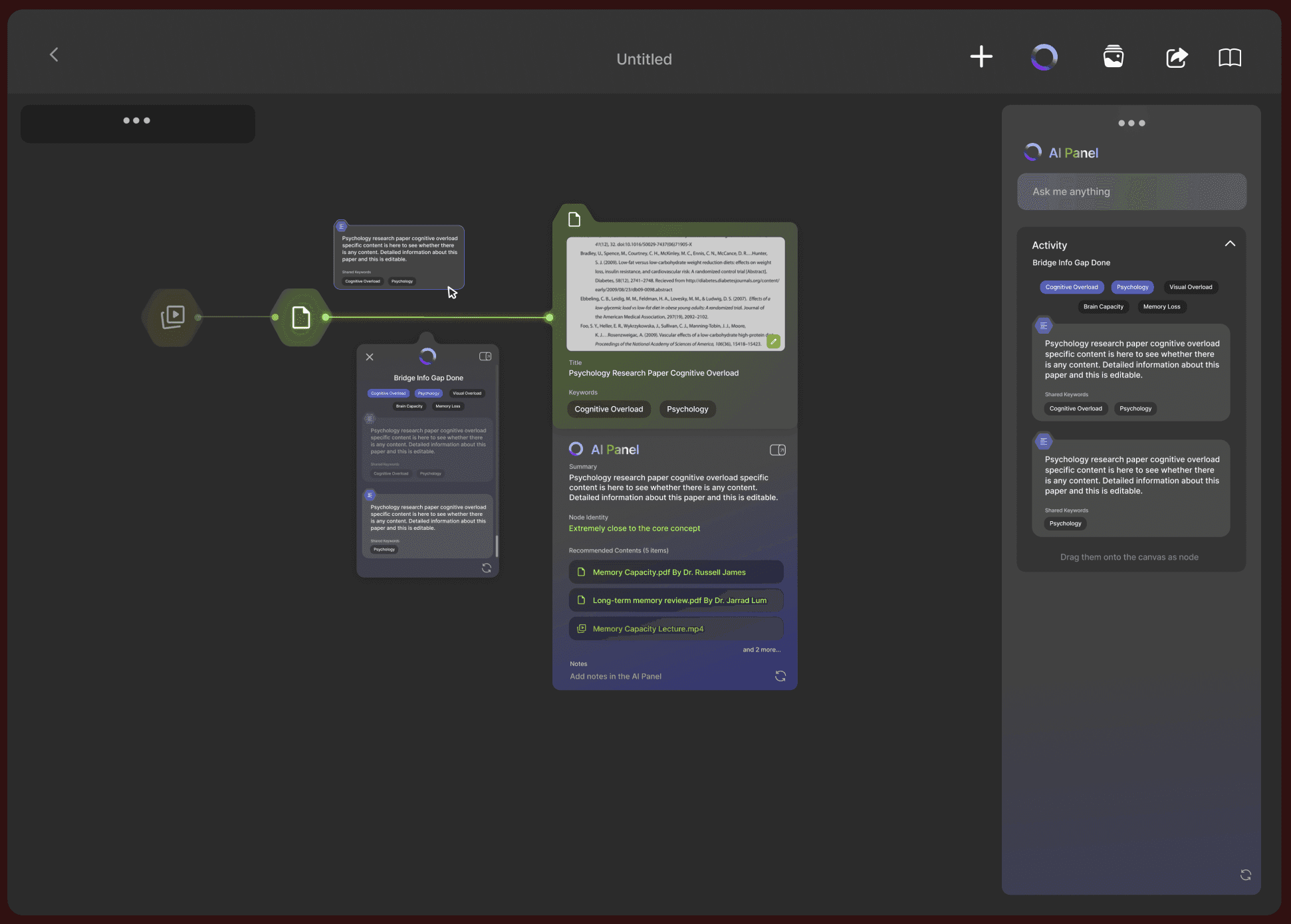
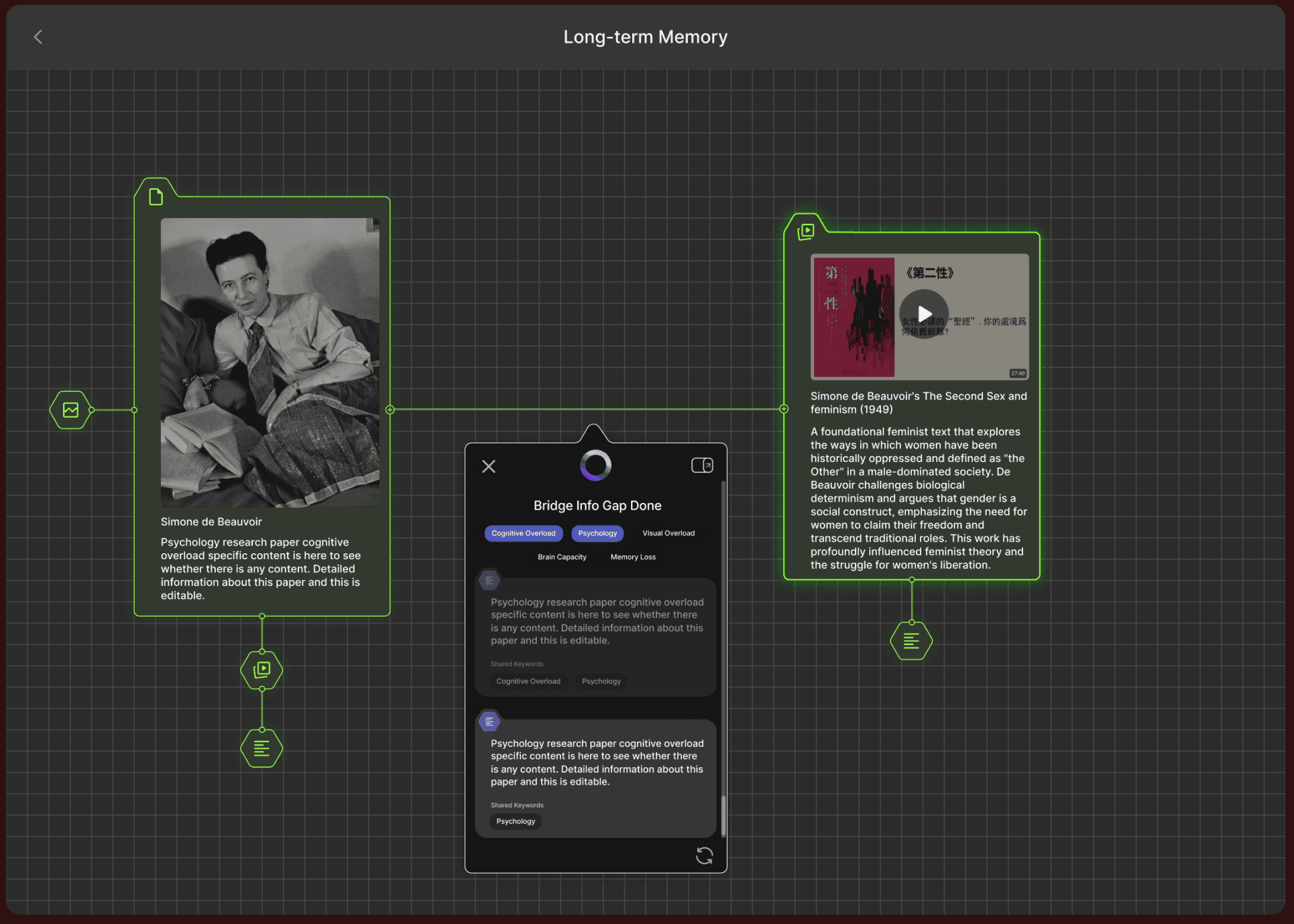
The solution is to present an animated bridging process that shows how ideas are merged and evolved.
Clearly present to users where the bridging will take place by encouraging them to review the content that needs to be operated on.
Clearly present to users where the bridging will take place by encouraging them to review the content that needs to be operated on.
Provide alternative recommended bridging points in the side AI panel for users to browse and choose from.
Provide alternative recommended bridging points in the side AI panel for users to browse and choose from.
Understanding AI Panels (Exploration)
Understanding AI Panels (Exploration)
Research indicates that many AI tools experience low user return rates due to prolonged learning curves, often caused by overly complex panels. Since panel content must adapt dynamically to different statuses, transforming complex information into clear and intuitive visuals becomes an even greater challenge.
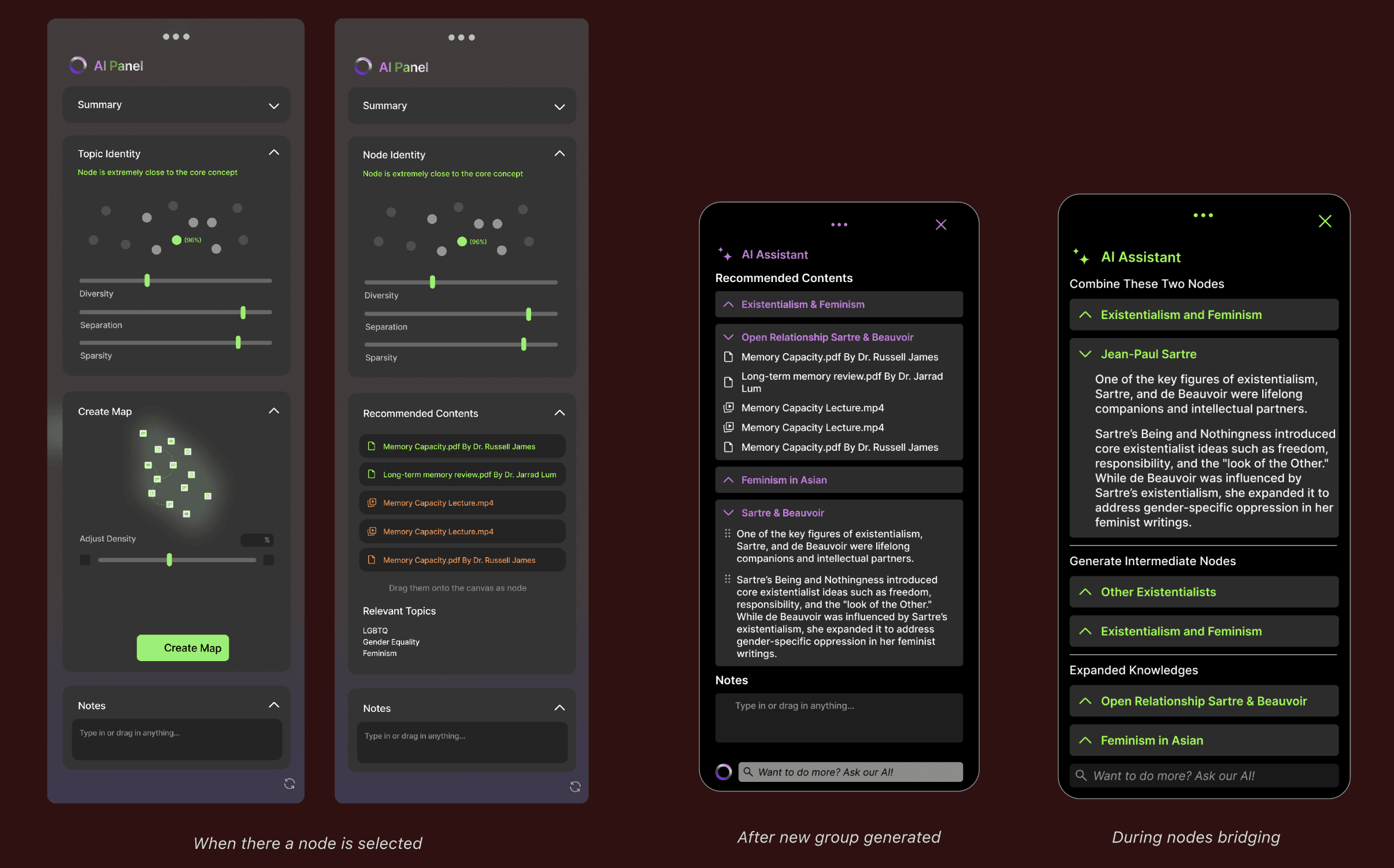
While the visual adjustment bar effectively conveys information hierarchy, displaying excessive information can lead to confusion.
While the visual adjustment bar effectively conveys information hierarchy, displaying excessive information can lead to confusion.
The initial idea was to include all AI-supported functions in the panel for every user condition. However, this approach turned the panel into a text-heavy interface, requiring excessive scrolling.
The initial idea was to include all AI-supported functions in the panel for every user condition. However, this approach turned the panel into a text-heavy interface, requiring excessive scrolling.
Understanding AI Panels (Solution)
Understanding AI Panels (Solution)
The final approach focused on offering a deeper understanding of potential explorations within a single node and connections among information clusters, all while maintaining visual consistency.
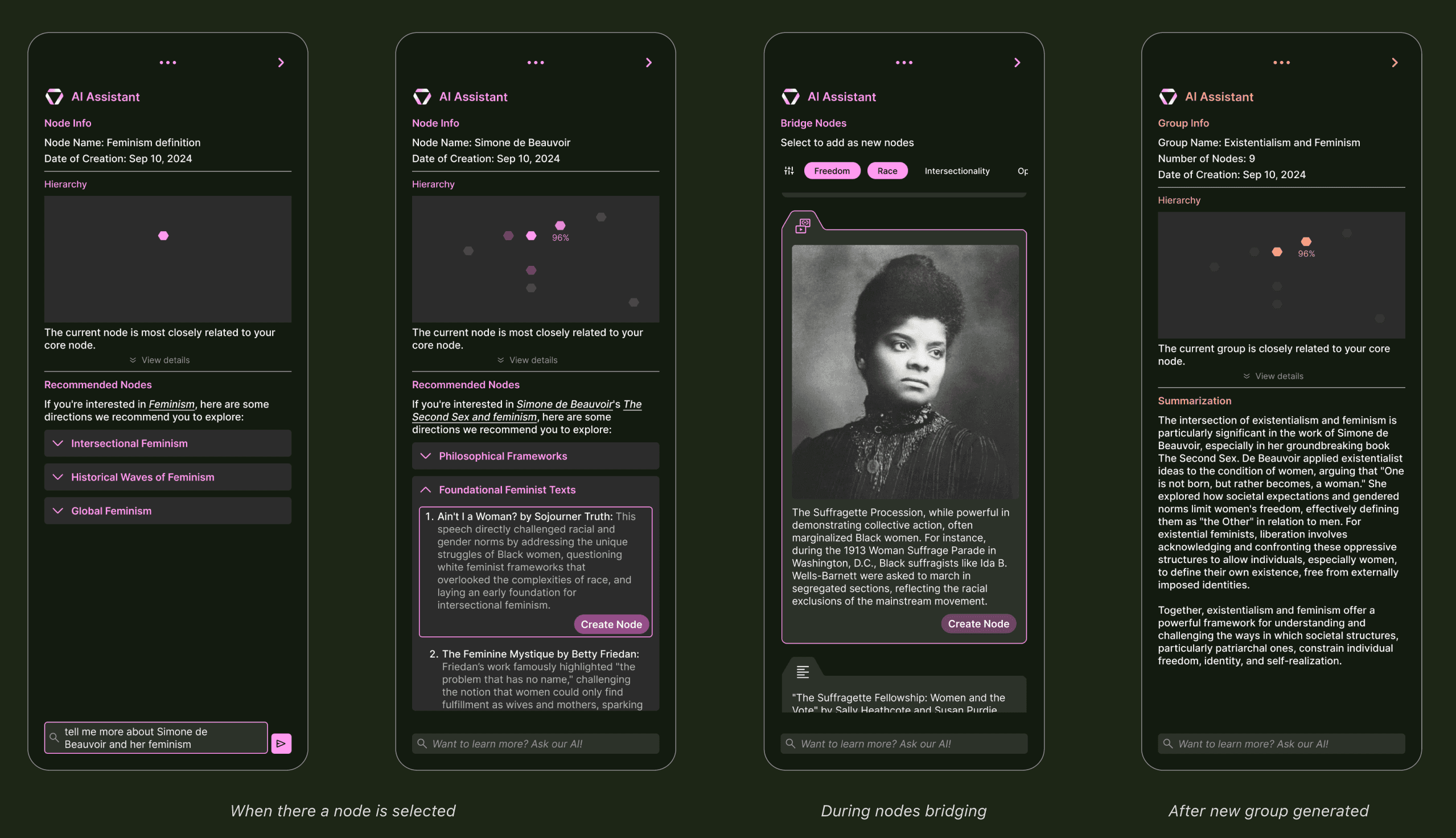
Conversational AI was included but not heavily emphasized at the start of the research, as the tool's primary goal is to spark original ideas. As a result, the chatbox is positioned discreetly at the bottom of the panel.
Information sparsity, density, and scarcity are calculated for each node to represent the information hierarchy. This helps inform the user of how closely the current node relates to the primary research topic.
Recommended information and detected missing information can be directly added to the canvas as new nodes.
When a node is clicked, the panel gently slides into the canvas from the right. The panel can also be accessed by clicking the HIVE logo in the bottom navigation bar.
Presenting with alternative visuals (Exploration)
Presenting with alternative visuals (Exploration)
Based on previous user interviews, many researchers expressed that presenting discovery outcomes has been a significant challenge, as extracting key data from long-term projects can be time-consuming. Therefore, the final challenge was to create alternative visuals that facilitate both presenting and self-learning, illustrating how ideas evolve across multiple dimensions and scales.
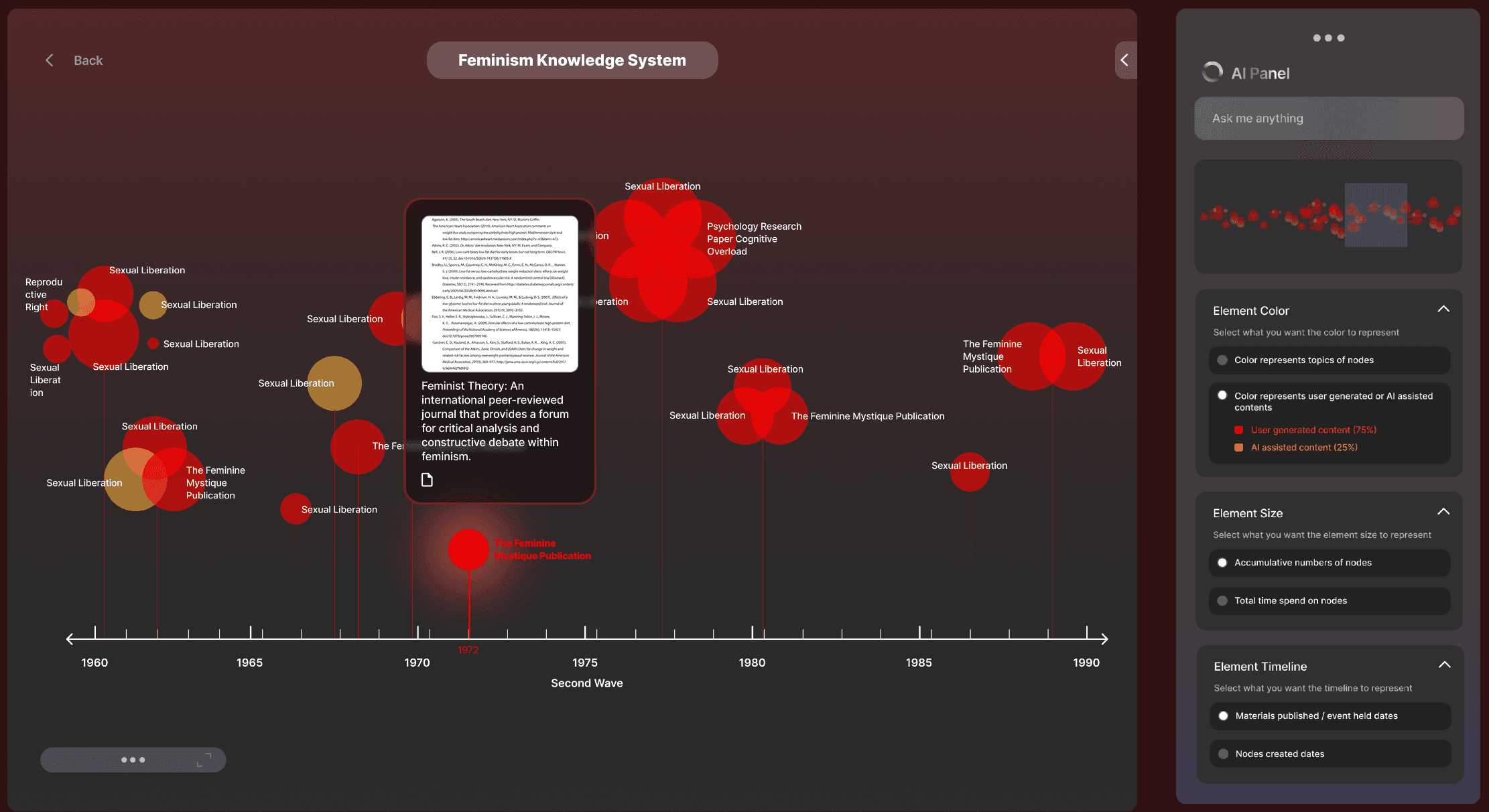
The timeline mapping successfully captures how ideas evolve while presenting the density and importance of each data point. However, the zoomed-in view can become overwhelming when information overlaps.
The timeline mapping successfully captures how ideas evolve while presenting the density and importance of each data point. However, the zoomed-in view can become overwhelming when information overlaps.
Extracting key information is already exhausting, and requiring multiple steps to adjust visuals can make it even more tiring. Offering users too many options for data adjustments can slow down the final refinement of key ideas.
Extracting key information is already exhausting, and requiring multiple steps to adjust visuals can make it even more tiring. Offering users too many options for data adjustments can slow down the final refinement of key ideas.
Presenting with alternative visuals (Solution)
Presenting with alternative visuals (Solution)
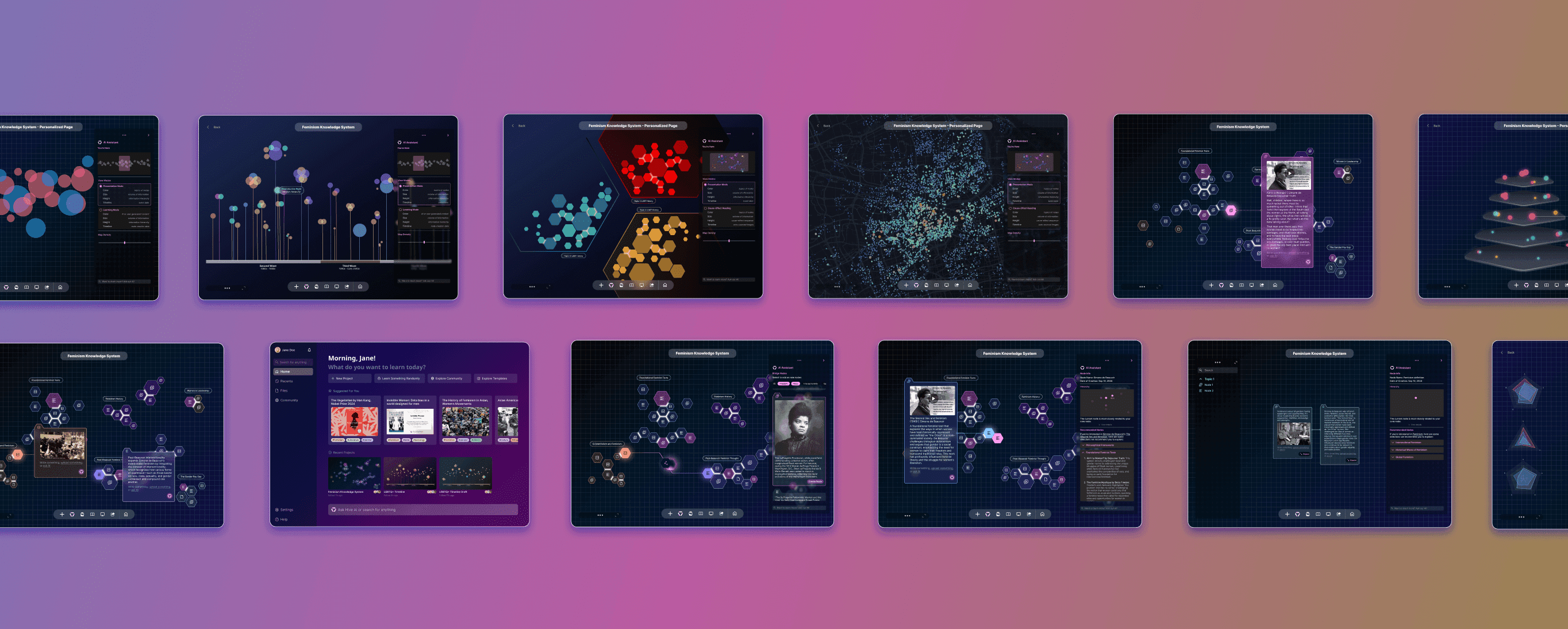
The solution is to offer various data visualizations with built-in view modes, enabling users to switch between a presentation mode that highlights how ideas evolved and their information hierarchy, and a self-discovery mode that reveals how many ideas are AI-assisted versus original.
When view modes are switched, the dimension levels of height, size, and length are adjusted to represent different types of information.
When view modes are switched, the dimension levels of height, size, and length are adjusted to represent different types of information.
Users can easily select the nodes they want to curate visuals for and generate diverse visualizations in seconds. The system will recommend the most suitable mapping for their data inputs, facilitating efficient presentation and discovery.
Users can easily select the nodes they want to curate visuals for and generate diverse visualizations in seconds. The system will recommend the most suitable mapping for their data inputs, facilitating efficient presentation and discovery.
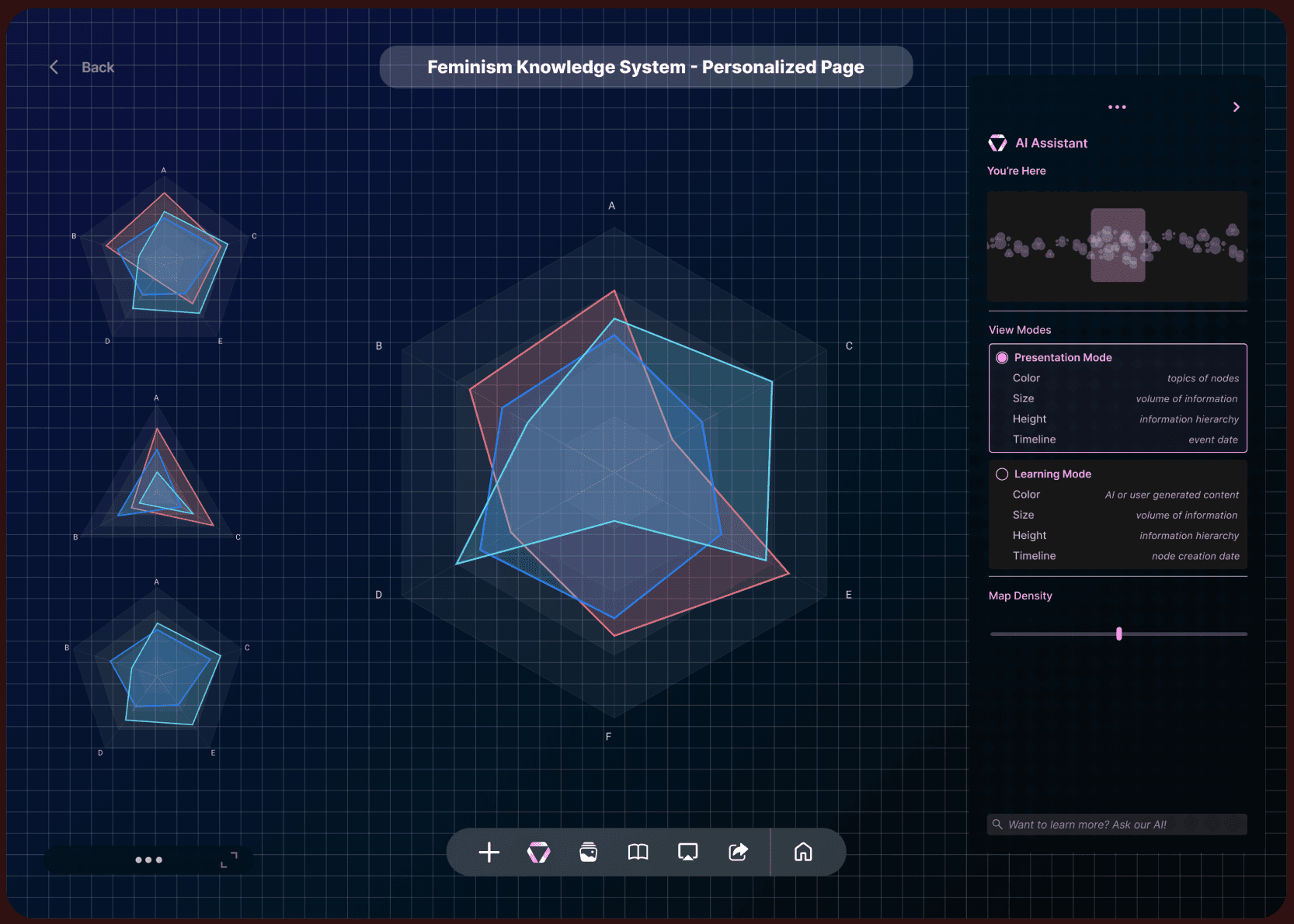
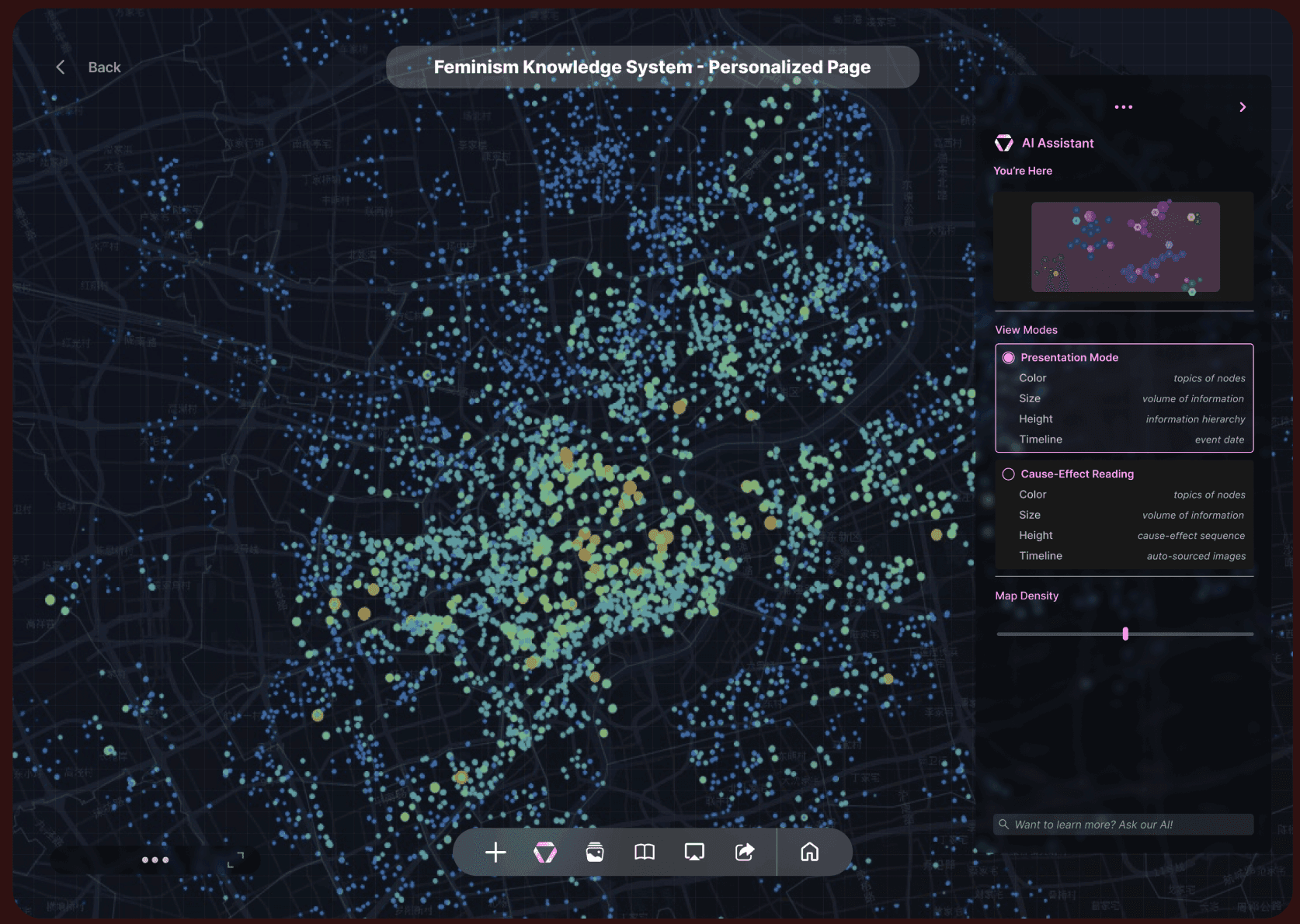
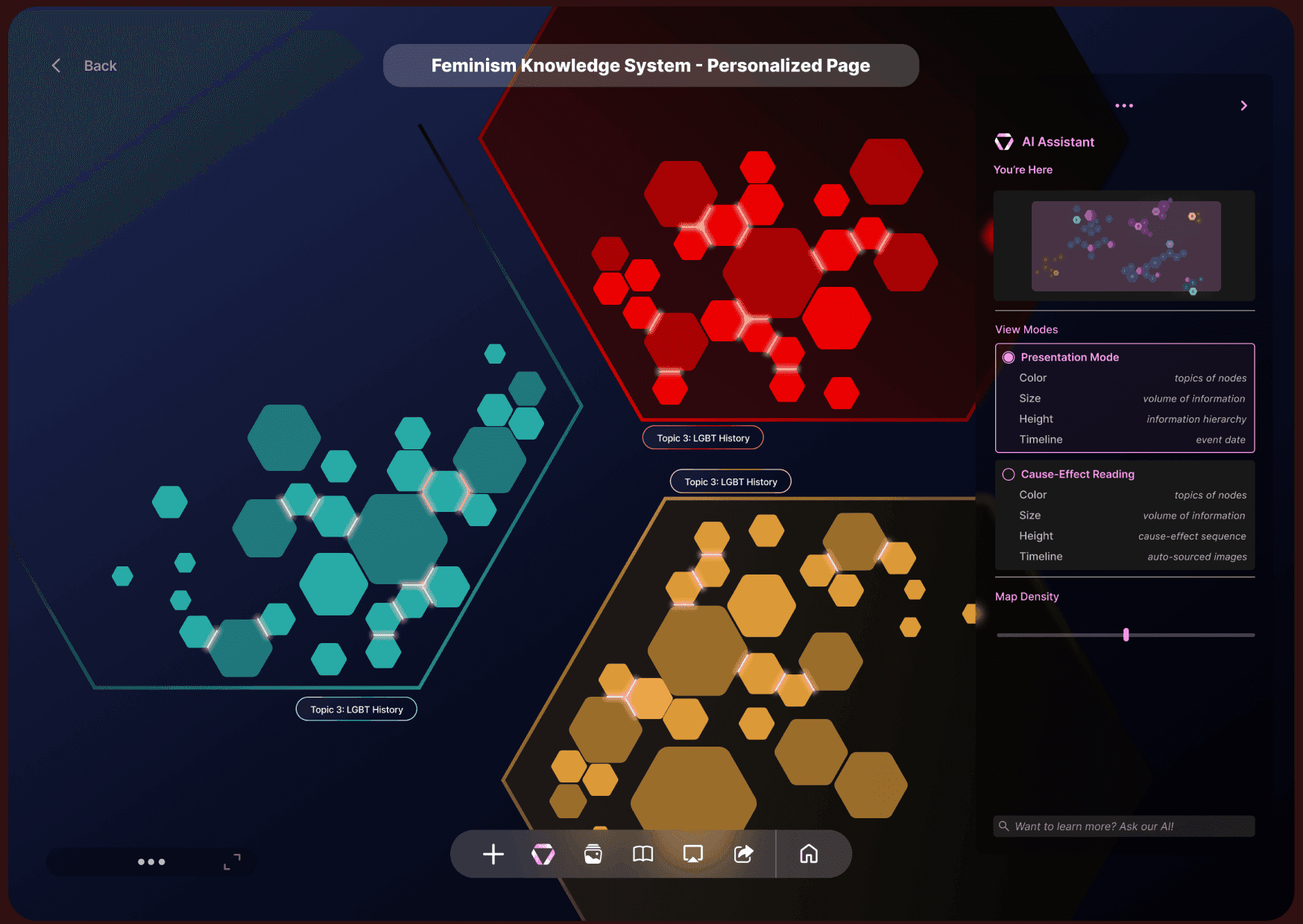
More visuals are under exploration.
More visuals are under exploration.
Impact and Outcome
User-Driven Design Process
One of the key takeaways was the importance of user feedback and iterative design. Conducting usability tests with target users has been crucial for B2B product designs, as each feature development requires a deep understanding of the specific challenges faced by stakeholders and identifying market gaps.
Navigating through uncertainty and making informed decisions, both individually and as a group, was a significant growth experience.
What's Next
Looking ahead, we envision expanding the reach of our solution through the development of extensions that can absorb information from existing research papers to generate data points.
We also look forward to diversifying our team by bringing in more engineers and psychologists to help develop a more comprehensive HIVE family. With a diverse team, we can benefit from a range of skill sets and backgrounds, providing us with unique insights.
What is HIVE.ai
Hive is a B2B desktop tool powered by large language model, designed to assist researchers and learners in organizing and visualizing thought processes. It bridges information gaps to spark inspiration and encourages users to independently explore ideas with subtle AI guidance.
Our Audience
Hive is primariliy designed for researchers who require tools to deeply explore, organize, and present their thought processes while expanding their knowledge network with accurate information.
Project Type
B2B
UXUI Design
Time Length
June 2024 - Jan 2025
My Role
UXUI Design Lead
Marketing video creator
Team
2 UX Researchers, 2 Visual Designers
3 Developers
Design Awards (so far)
2025 Red Dot Design Award
2025 A'Design Award
MUSE Design (Gold)
Indigo Design Award (Gold)
Product Hunt 2024
In 2024, our beta prototype got a 4/5 rating on "the best designed interface" for emerging AI tool.
Product Demo Video creator: Huiyang Chen
Background
According to a study by Oxford University, 76% of researchers use AI tools in their work. However, only 16% of those tools are designed for research, learning and data visualization.
What we want to rennovate
Steep Learning Curve
Users face a steep learning curve due to the overly complex user interface, hindering efficient usage of the platform.
Lack of Growth Mindset
AI-generated structures and content offer limited flexibility for changes, failing to foster a growth mindset, identify missing information, or spark inspiration.
Limited Flexibility for Complex Visuals
85% of existing AI tools cannot create or interpret complex data visualizations, which are essential for research and data analysis.
Feature 1
Build From the Ground Up
Begin creating node elements by dragging or uploading various types of materials, such as videos, voice recordings, links, and text, into an empty container on the freeform canvas.
Feature 2
Co-Create with AI
View node status, including information scarcity, disparity, and hierarchy, and discover new sources of inspiration by interacting with the intuitive panel.
Feature 3
Smart Grouping
When topics are identified as interconnected, data points can be regrouped, and color coding will automatically adjust to represent their union.
Feature 4
Bridging Info Gap
Use the side pane to explore recommended data points that can fill in the missing node connection. Positions and colors of new clusters will be automatically generated.
Feature 5
Presentation and Discovery
Transform each research project into infographics to showcase progress and findings while gaining insights into personal research and learning strengths across various topics.
Research & Discover
Competitor Analysis
Steep Learning Curve
Users face a steep learning curve due to the overly complex user interface, hindering efficient usage of the platform.
Restricted Growth
AI-generated structures and content offer limited flexibility for changes, failing to foster a growth mindset, identify missing information, or spark inspiration.
Inaccurate Keyword Filtering
Filtering information using keywords is often inaccurate, which prolongs the process of finding relevant materials.
Discovery
Our team conducted 35 semi-structured interviews with graduate researchers from top 50 universities in the U.S., with 23 participants providing detailed walkthroughs of their current tools and research methods.
"When I’m deep into research, I tend to focus on isolated pieces of information and miss the bigger picture of how everything ties together."
"I sometimes lose sight of how my initial thoughts transformed as I dug deeper into the research. It feels like the process gets blurred."
(Zoom interview screenshots)
Through observations from field research, I discovered that their work space were set up in a modular way that a different areas of the desk dedicates to a certain function. The intention was to see hierarchy in tasks and to categorize information into big chunks. This helps them to improve memory retension.
Understanding User Needs
Main pain points
01
Over-reliance on AI
Over-reliance on pre-set prompts for quick answers diminishes curiosity and ability to self explore, further leads to untrained minds.
02
Fail to identify interconnections
Difficulty adapting to knowledge web as a whole leads to lack of comprehensive understanding across topics.
03
Challenges in Tracking Learning Progress
Failure of seeing how thoughts evolve impedes reflection and motivation.
04
Difficulties in presenting collective thoughts
Time-consuming to create a visual representation of the entire research scope from multiple data perspectives.
(Yellow steps are the most likely to cause fatigue)
Concept Development
Ecological Thinking
Ecological thinking means no single idea dominates for too long. When one idea takes up too much attention, we risk falling into cognitive biases, narrow thinking, or even harmful thought patterns. This can disrupt the balance of our thinking and limit our ability to explore new ideas.
The goal for Hive.ai is to ecological thinking is to minimize bias as much as possible while encouraging divergent thinking and maintaining focus to ensure a healthy, balanced flow of ideas.
Features Map
After gathering insights from our research, my team and I brainstormed features to address user needs. We then prioritized them from high to low, which helped us identify the initial MVP.
Design
Starting With a Node Element (Exploration)
One of the biggest challenges is to ensure efficient material input to quickly build up knowledge assets.
Tag-based information search nodes are very time-consuming to navigate to the target nodes.
A clustered interface makes it very difficult to track information.
An additional step is required to choose the type of node before inserting material.
Starting With a Node Element (Solution)
Our solution is to offer freeform information containers that accommodate all input types—videos, images, text, and voice—minimizing the time required to input data into the correct entry point.
Directly drag materials from your computer desktop or input them from any device.
Encourage user-generated inputs instead of over-reliance on AI to initiate ideas.
Supporting idea generation from any source boosts creativity and imagination.
Connecting Nodes (Exploration)
Imagine having hundreds of data points with information scattered too widely to form meaningful connections.
The industry-standard method of string-connecting nodes often turns data points into a visually overwhelming cluster, slowing down the process of targeting and grouping.
Difficult to identify the information hierarchy when data points become complex.
Connecting Nodes (Solution)
The solution effectively visualizes connections while highlighting information priorities, scarcity, density, and disparity. Furthermore, it incorporates AI-driven support to generate new nodes, fostering inspiration and innovation.
When zoomed out, the rectangular nodes with detailed information transform into hexagons, providing a quick overview of the scope and making it easier to find information.
The hexagon shape represent solid, expandable connections that can easily attach to similar topics, regroup, or detach.
Bridging info gaps (Exploration)
Tracking the progress of thinking has been one of the most valuable processes in research. Finding the missing data pieces will strengthen the knowledge web and improve memory retention.
Using pop-up screens not only requires many clicks but also distracts from the visual when there are hundreds of nodes in the background.
Not giving users the option to choose the bridge outcome or providing too many filtering steps can result in either limited research or an unnecessarily complicated flow.
Briding info gaps (Solution)
The solution is to present an animated bridging process that shows how ideas are merged and evolved.
Clearly present to users where the bridging will take place by encouraging them to review the content that needs to be operated on.
Provide alternative recommended bridging points in the side AI panel for users to browse and choose from.
Understanding AI Panels (Exploration)
Research indicates that many AI tools experience low user return rates due to prolonged learning curves, often caused by overly complex panels. Since panel content must adapt dynamically to different statuses, transforming complex information into clear and intuitive visuals becomes an even greater challenge.
While the visual adjustment bar effectively conveys information hierarchy, displaying excessive information can lead to confusion.
The initial idea was to include all AI-supported functions in the panel for every user condition. However, this approach turned the panel into a text-heavy interface, requiring excessive scrolling.
Understanding AI Panels (Solution)
The final approach focused on offering a deeper understanding of potential explorations within a single node and connections among information clusters, all while maintaining visual consistency.
Conversational AI was included but not heavily emphasized at the start of the research, as the tool's primary goal is to spark original ideas. As a result, the chatbox is positioned discreetly at the bottom of the panel.
Information sparsity, density, and scarcity are calculated for each node to represent the information hierarchy. This helps inform the user of how closely the current node relates to the primary research topic.
Recommended information and detected missing information can be directly added to the canvas as new nodes.
When a node is clicked, the panel gently slides into the canvas from the right. The panel can also be accessed by clicking the HIVE logo in the bottom navigation bar.
Presenting with alternative visuals (Exploration)
Based on previous user interviews, many researchers expressed that presenting discovery outcomes has been a significant challenge, as extracting key data from long-term projects can be time-consuming. Therefore, the final challenge was to create alternative visuals that facilitate both presenting and self-learning, illustrating how ideas evolve across multiple dimensions and scales.
The timeline mapping successfully captures how ideas evolve while presenting the density and importance of each data point. However, the zoomed-in view can become overwhelming when information overlaps.
Extracting key information is already exhausting, and requiring multiple steps to adjust visuals can make it even more tiring. Offering users too many options for data adjustments can slow down the final refinement of key ideas.
Presenting with alternative visuals (Solution)
The solution is to offer various data visualizations with built-in view modes, enabling users to switch between a presentation mode that highlights how ideas evolved and their information hierarchy, and a self-discovery mode that reveals how many ideas are AI-assisted versus original.
When view modes are switched, the dimension levels of height, size, and length are adjusted to represent different types of information.
Users can easily select the nodes they want to curate visuals for and generate diverse visualizations in seconds. The system will recommend the most suitable mapping for their data inputs, facilitating efficient presentation and discovery.
More visuals are under exploration.
Impact and Outcome
User-Driven Design Process
One of the key takeaways was the importance of user feedback and iterative design. Conducting usability tests with target users has been crucial for B2B product designs, as each feature development requires a deep understanding of the specific challenges faced by stakeholders and identifying market gaps.
Navigating through uncertainty and making informed decisions, both individually and as a group, was a significant growth experience.
What's Next
Looking ahead, we envision expanding the reach of our solution through the development of extensions that can absorb information from existing research papers to generate data points.
We also look forward to diversifying our team by bringing in more engineers and psychologists to help develop a more comprehensive HIVE family. With a diverse team, we can benefit from a range of skill sets and backgrounds, providing us with unique insights.